
Unified
Address
Experience
Duration : 4 Weeks
Role: Product Designer, UX Researcher, Frontend Development
Brands: Dominos, Popeyes, Hongs Kitchen
2025
May
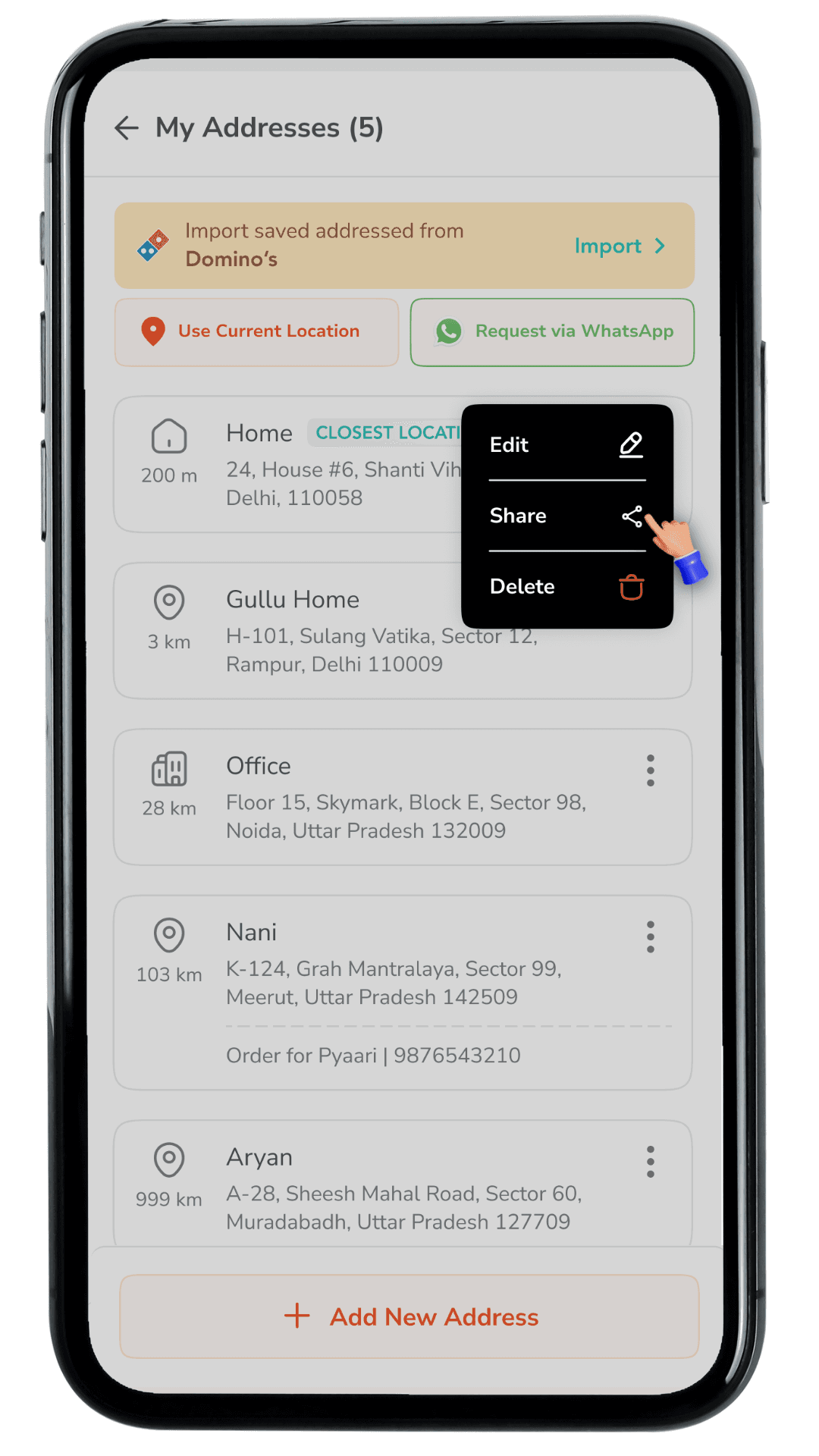
Jubilant runs multiple consumer food brands across separate apps (Domino’s, Popeyes, Hong's Kitchen and Dunkin' Donuts ).
Users frequently order for family or friends and also switch between brands. However, addresses saved in one brand do not carry over to another, and there is no simple way to share an address quickly with someone else.
As a result, users must re-enter the same address details repeatedly, especially when trying a new brand app. This increases checkout time, creates avoidable address errors, and can lead to order drop-offs at a high-intent stage.
Address setup becomes repetitive
Checkout slows down at the address step
Sharing addresses is manual and error-prone
Addresses cannot be transferred across brands
Re-entry increases address mistakes
Addresses cannot be transferred across brands
Sharing addresses is manual and error-prone
Checkout slows down at the address step
Address setup becomes repetitive
Addresses cannot be transferred across brands
Sharing addresses is manual and error-prone
Checkout slows down at the address step
Address setup becomes repetitive
Addresses cannot be transferred across brands
Sharing addresses is manual and error-prone
Checkout slows down at the address step
Address setup becomes repetitive
Addresses cannot be transferred across brands
Sharing addresses is manual and error-prone
Checkout slows down at the address step
Address setup becomes repetitive
Address setup becomes repetitive
Checkout slows down at the address step
Sharing addresses is manual and error-prone
Addresses cannot be transferred across brands
Re-entry increases address mistakes
Cross-brand friction: Users installing a new Jubilant app must manually add addresses again.
Ordering for others: Sharing an address over chat is manual and error-prone.
High-intent failure point: Address entry happens near checkout, so friction directly impacts conversion.
Trust and accuracy: Incorrect addresses can cause delivery delays, failed deliveries, and user frustration.
How we might help users reuse and share delivery addresses across Jubilant brand apps so ordering becomes
faster, more accurate, and more convenient,
especially during checkout?
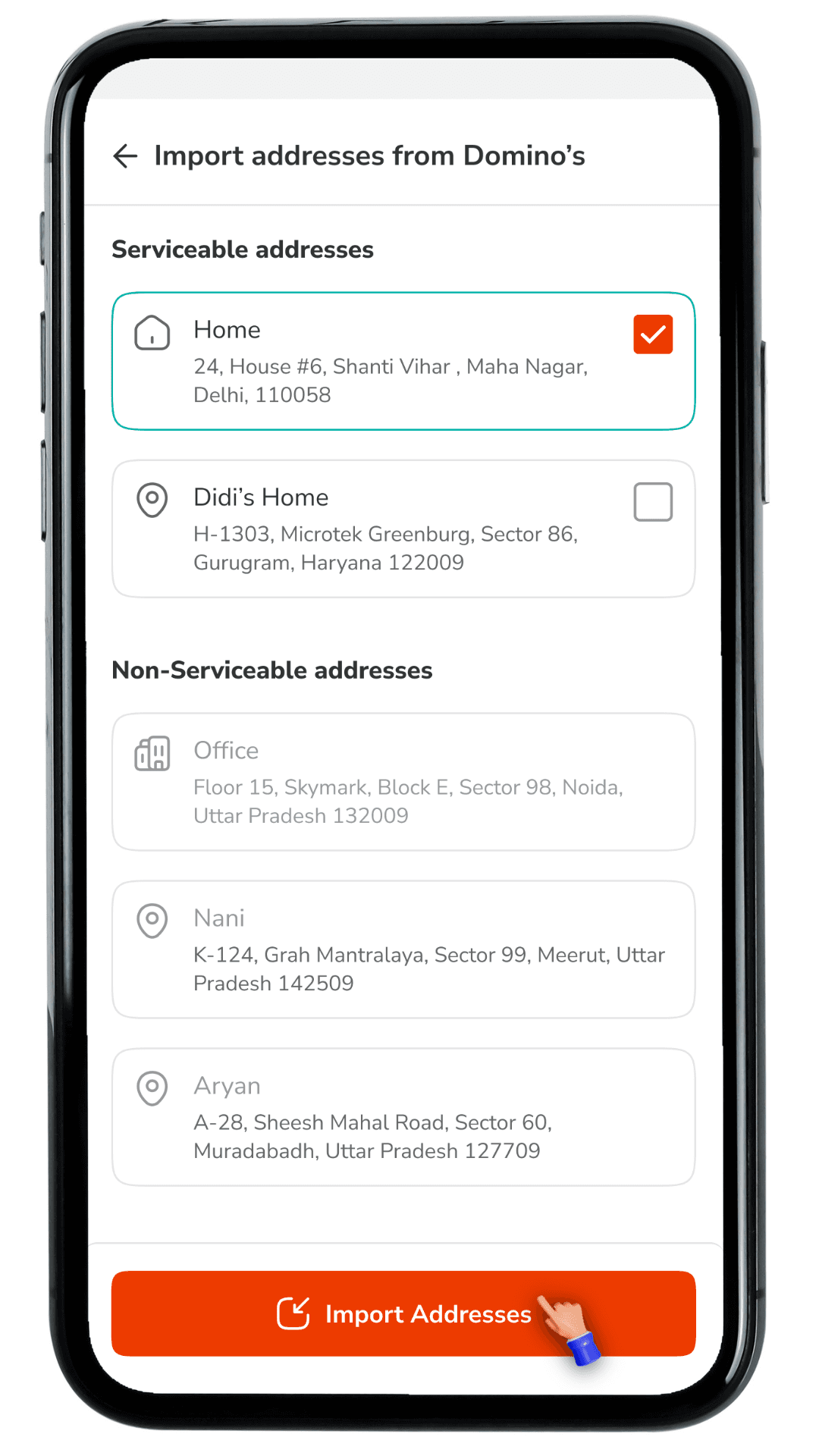
To reduce address friction at checkout and make cross-brand ordering effortless, we introduced a unified address experience with the following solutions:
Import Saved Addresses from Domino’s
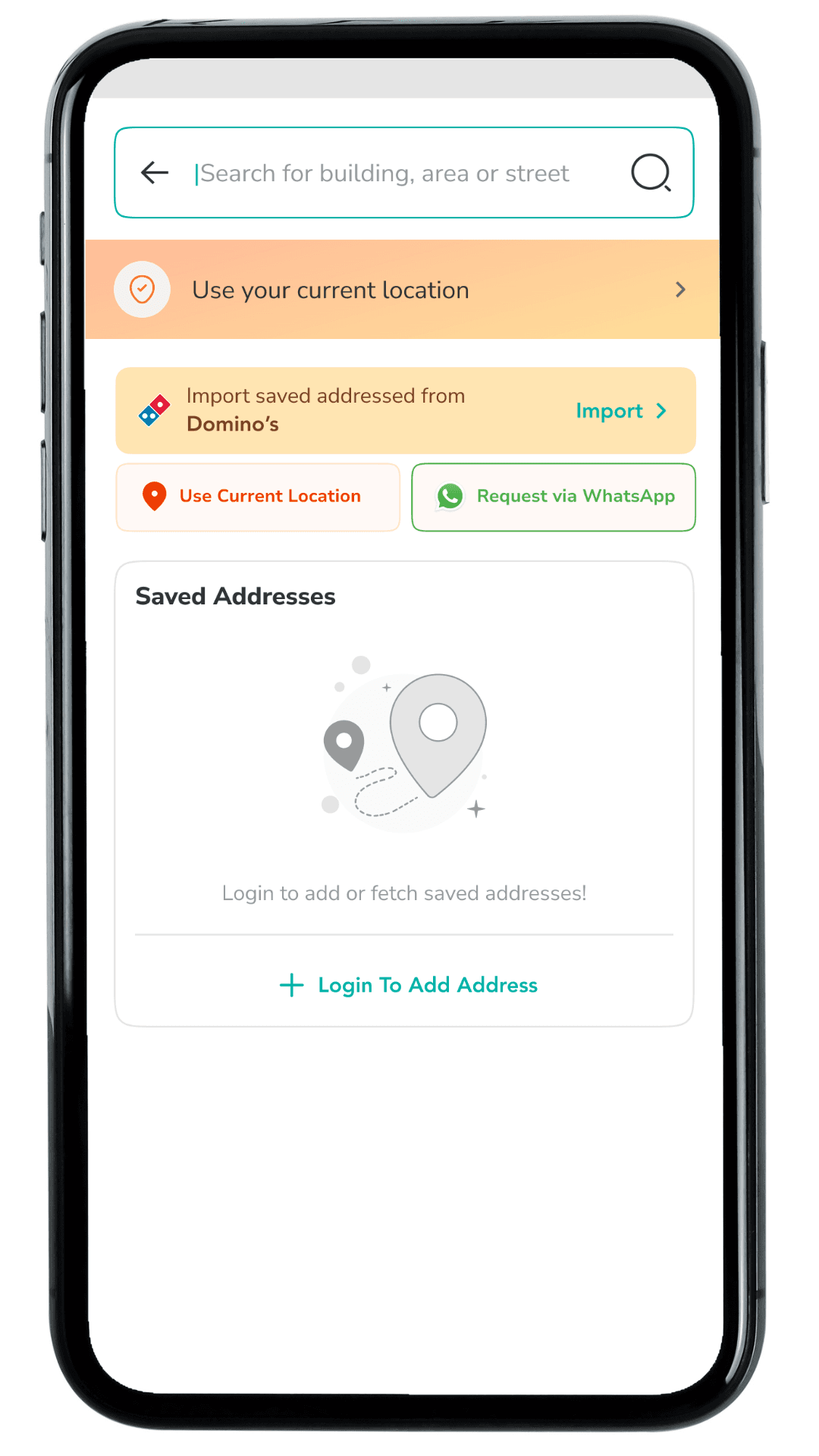
Add an entry point inside My Addresses and the Select an Address bottom sheet so users can import their Domino’s saved addresses without re-entering details. This supports first-time users of a new Jubilant brand app and speeds up address setup at the highest-intent stage.
Import screen with “Serviceable” vs “Non-serviceable”
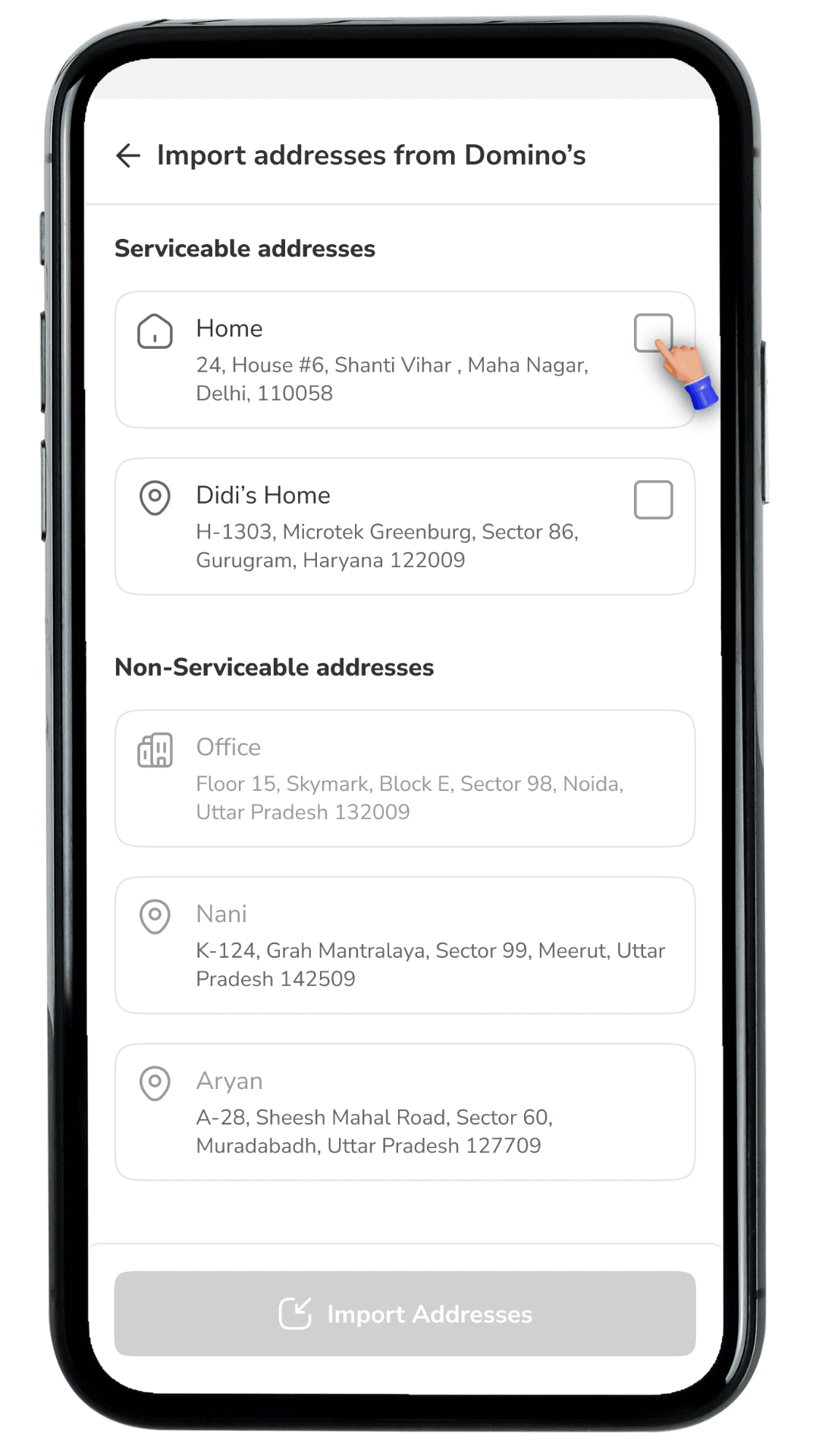
Create a dedicated Import addresses from Domino’s screen that clearly separates addresses into Serviceable (eligible to import and use immediately) and Non-serviceable (shown for reference but not selectable). This prevents failed checkouts and makes it instantly clear which addresses will work for the user’s current ordering context.
Import screen with “Serviceable” vs “Non-serviceable”
Create a dedicated Import addresses from Domino’s screen that clearly separates addresses into Serviceable (eligible to import and use immediately) and Non-serviceable (shown for reference but not selectable). This prevents failed checkouts and makes it instantly clear which addresses will work for the user’s current ordering context.
Selection-based import with clear CTA
Allow users to select one or more addresses and enable the CTA only when a valid selection is made. The Import Addresses button stays disabled by default to avoid accidental imports and guide the user through a clean, predictable action.
Trust-building states and confirmations
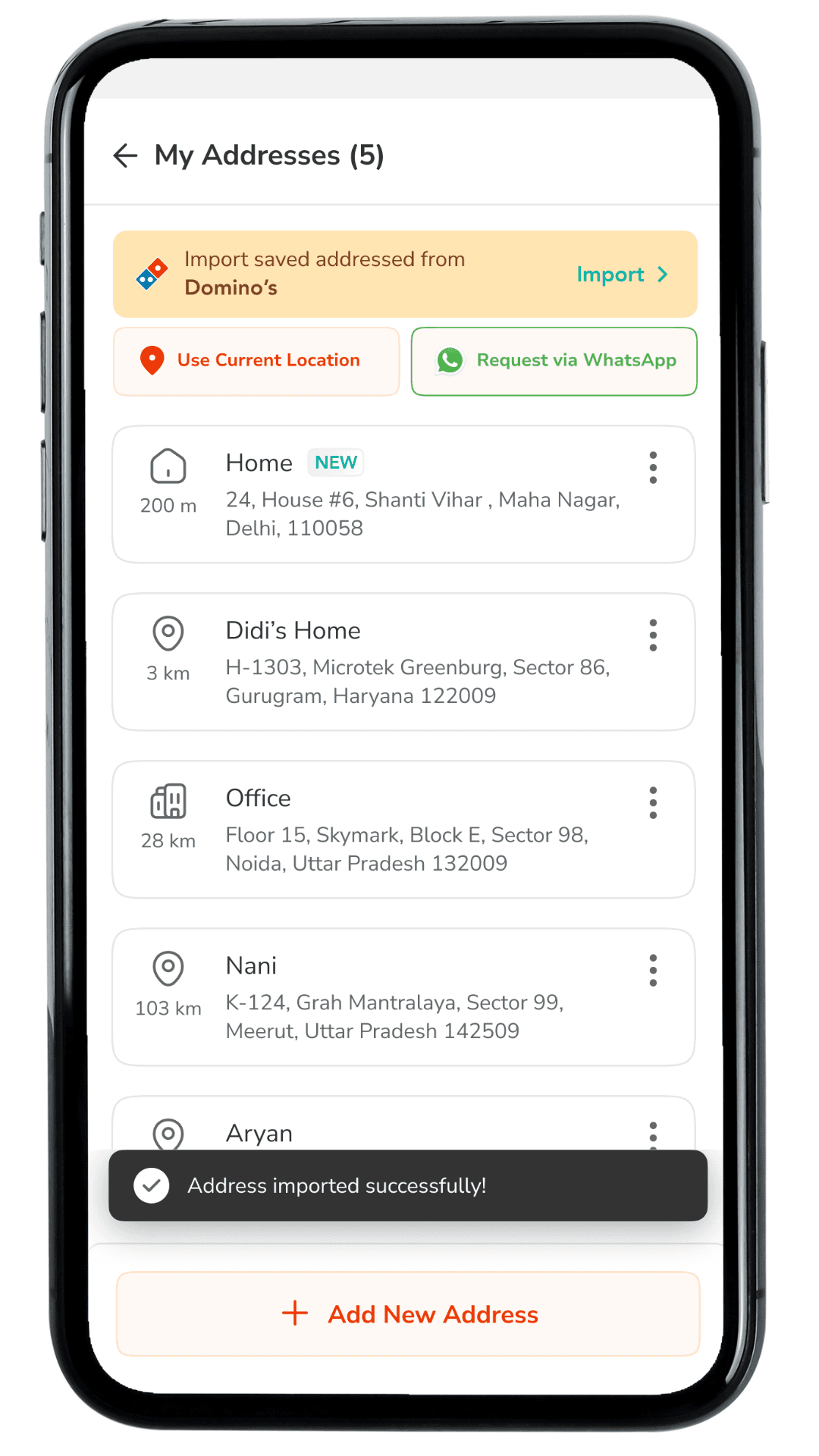
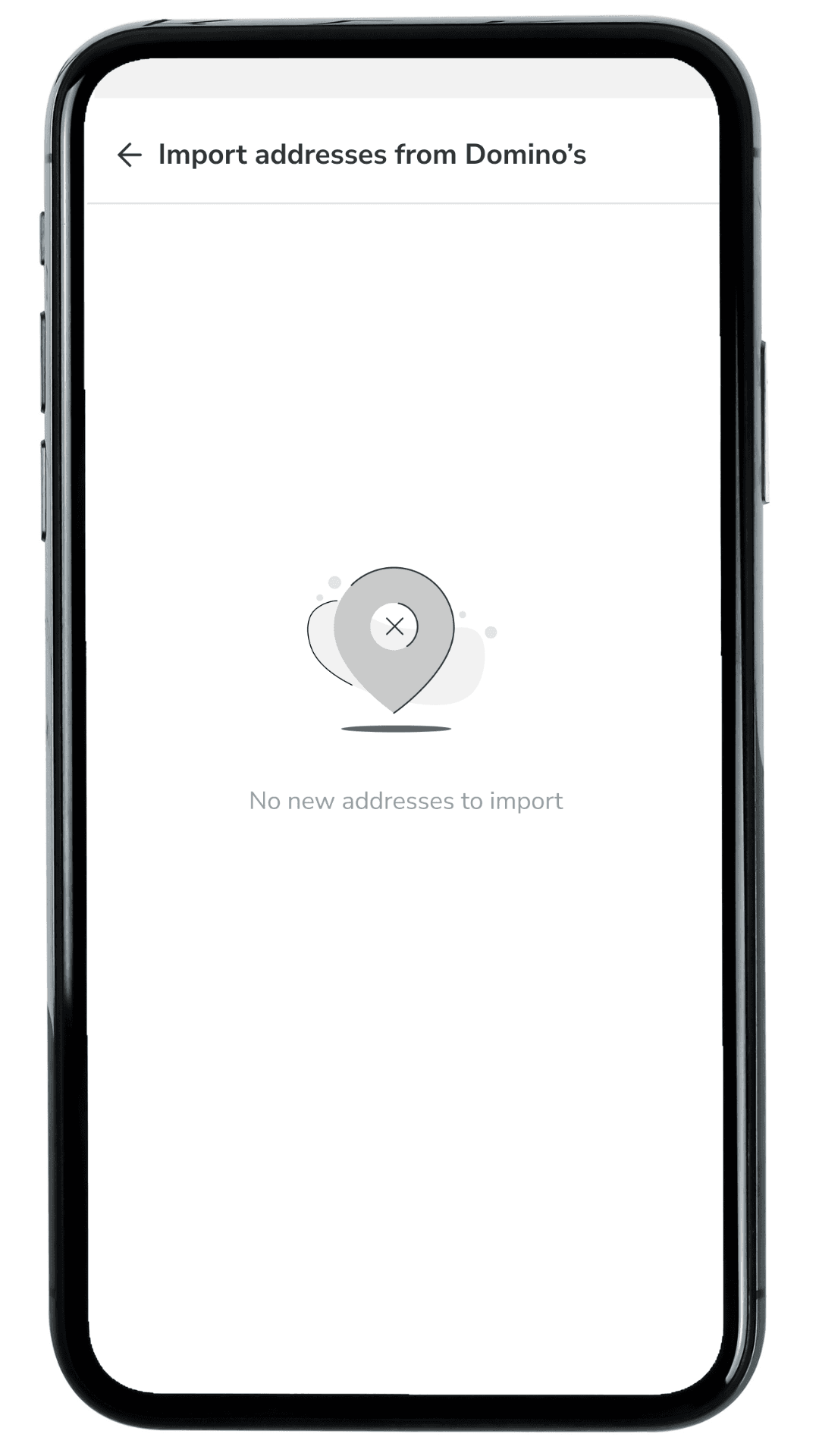
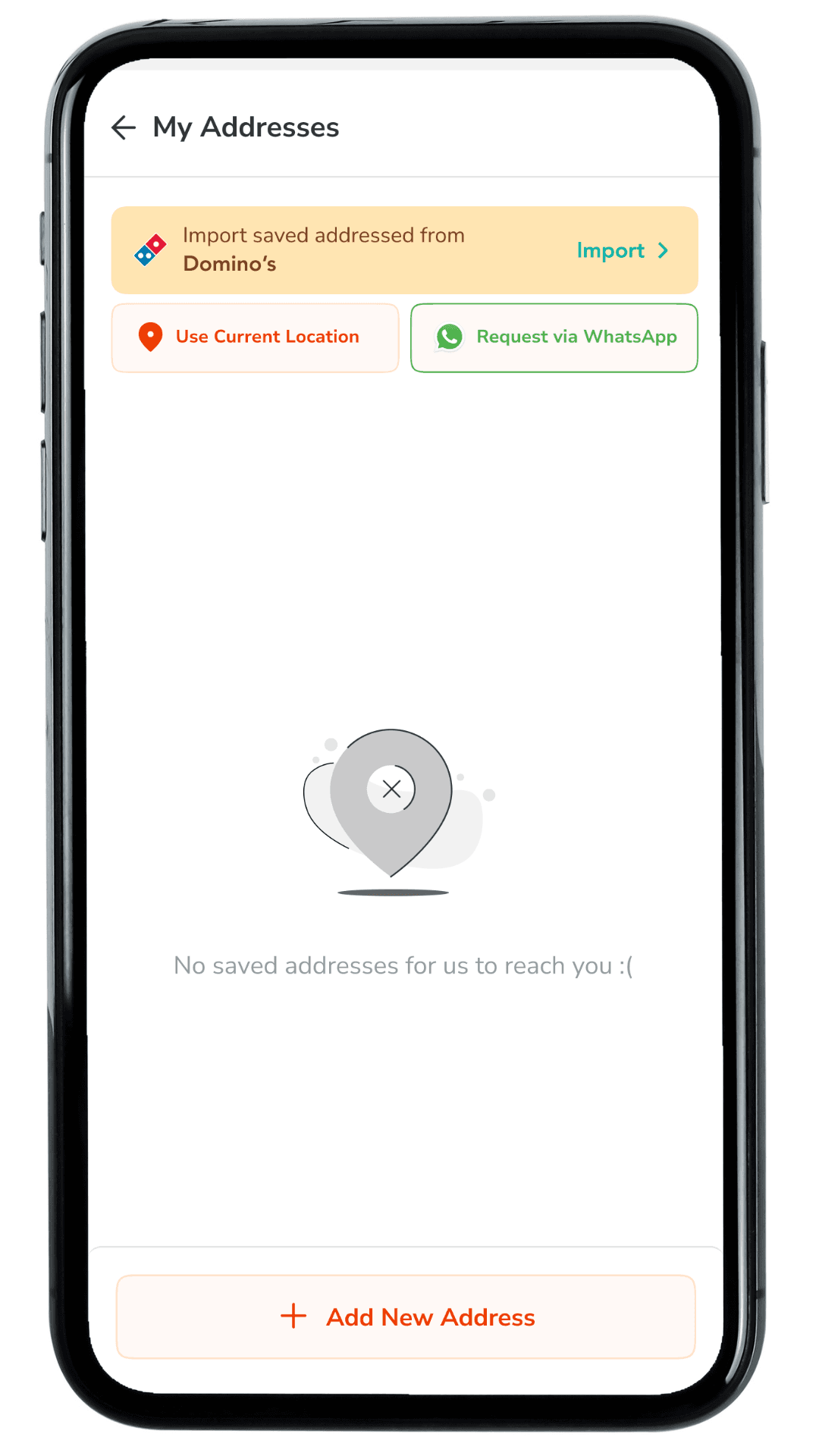
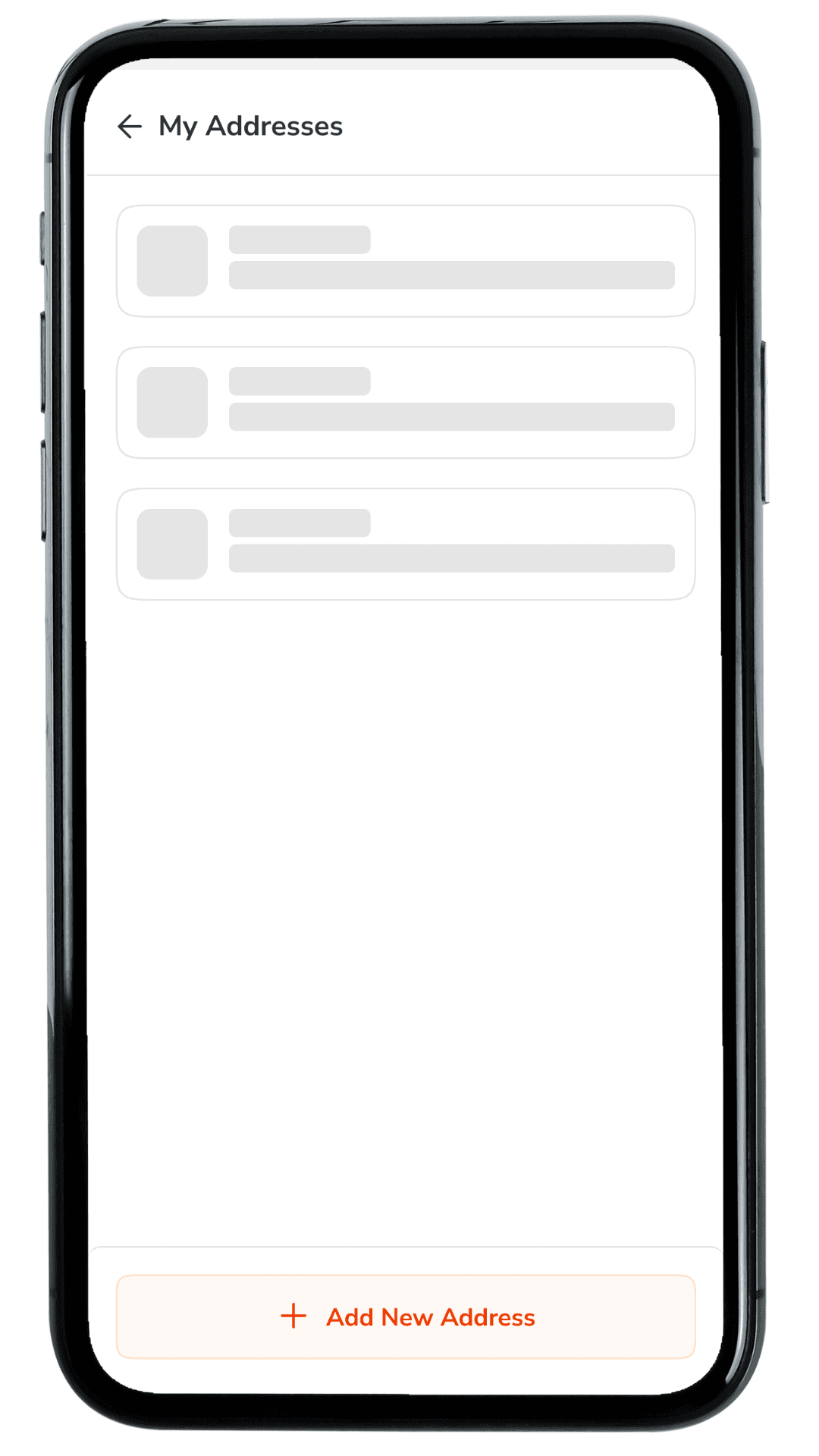
Build trust with complete system states: Loading shimmer while fetching saved addresses, Empty state when nothing is available to import And a success confirmation with the imported address highlighted (NEW tag) so the outcome is instantly visible.
Target Audience
01
The Ecosystem User
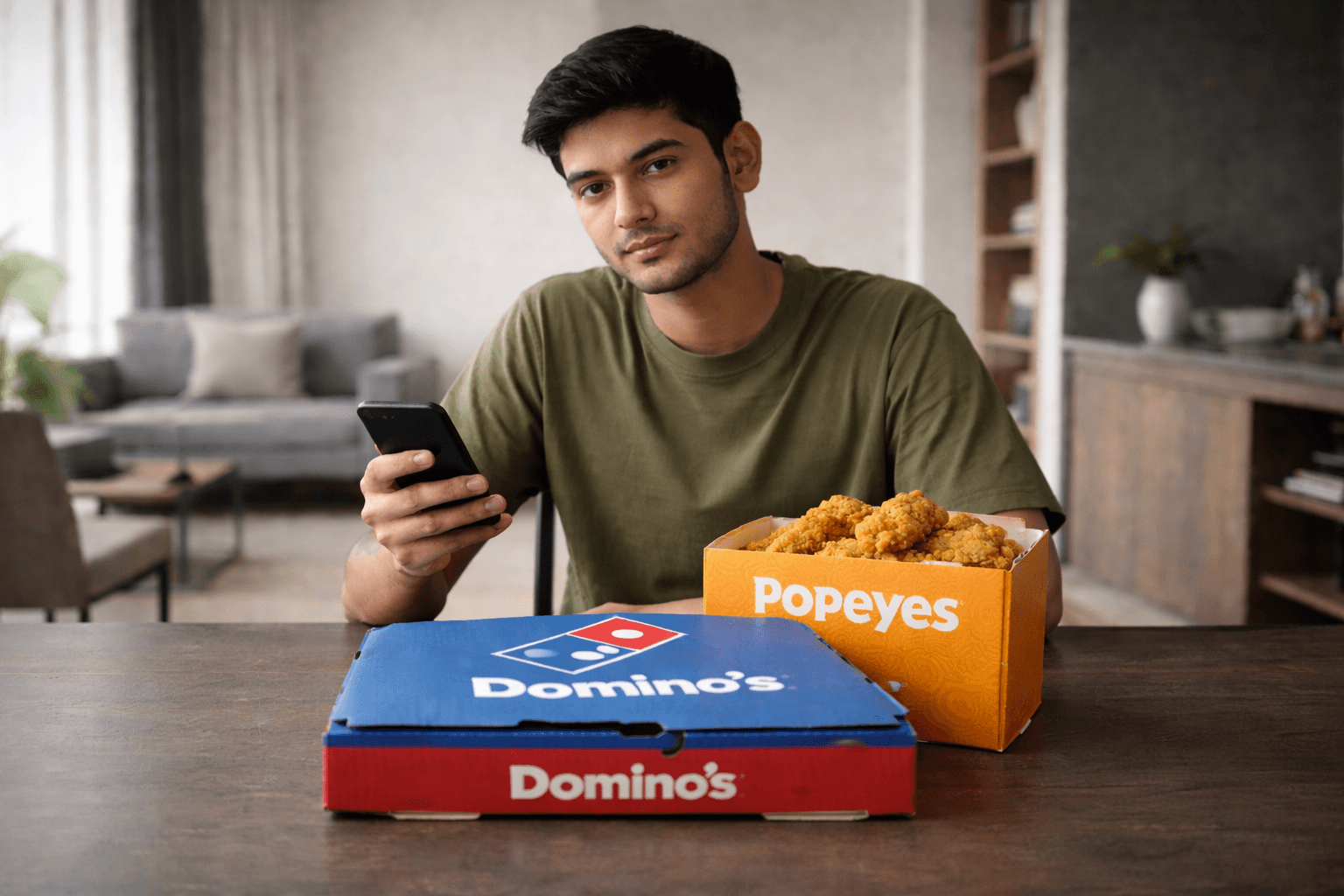
People who love both our brands (Domino's & Popeyes) but hate double-work.
02
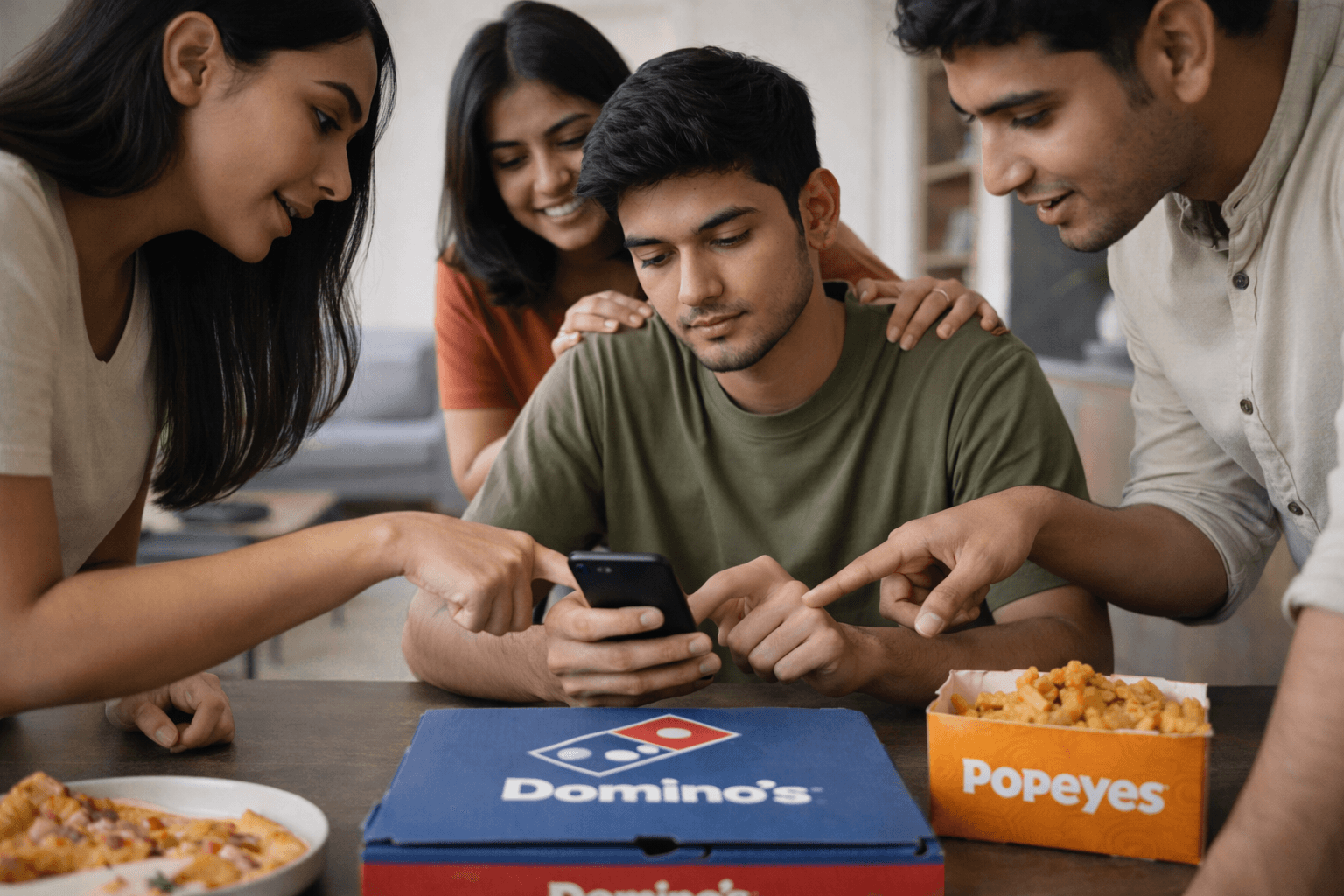
The Designated Orderer
The friend or family member who always places the order for the group.
03
The Guest User
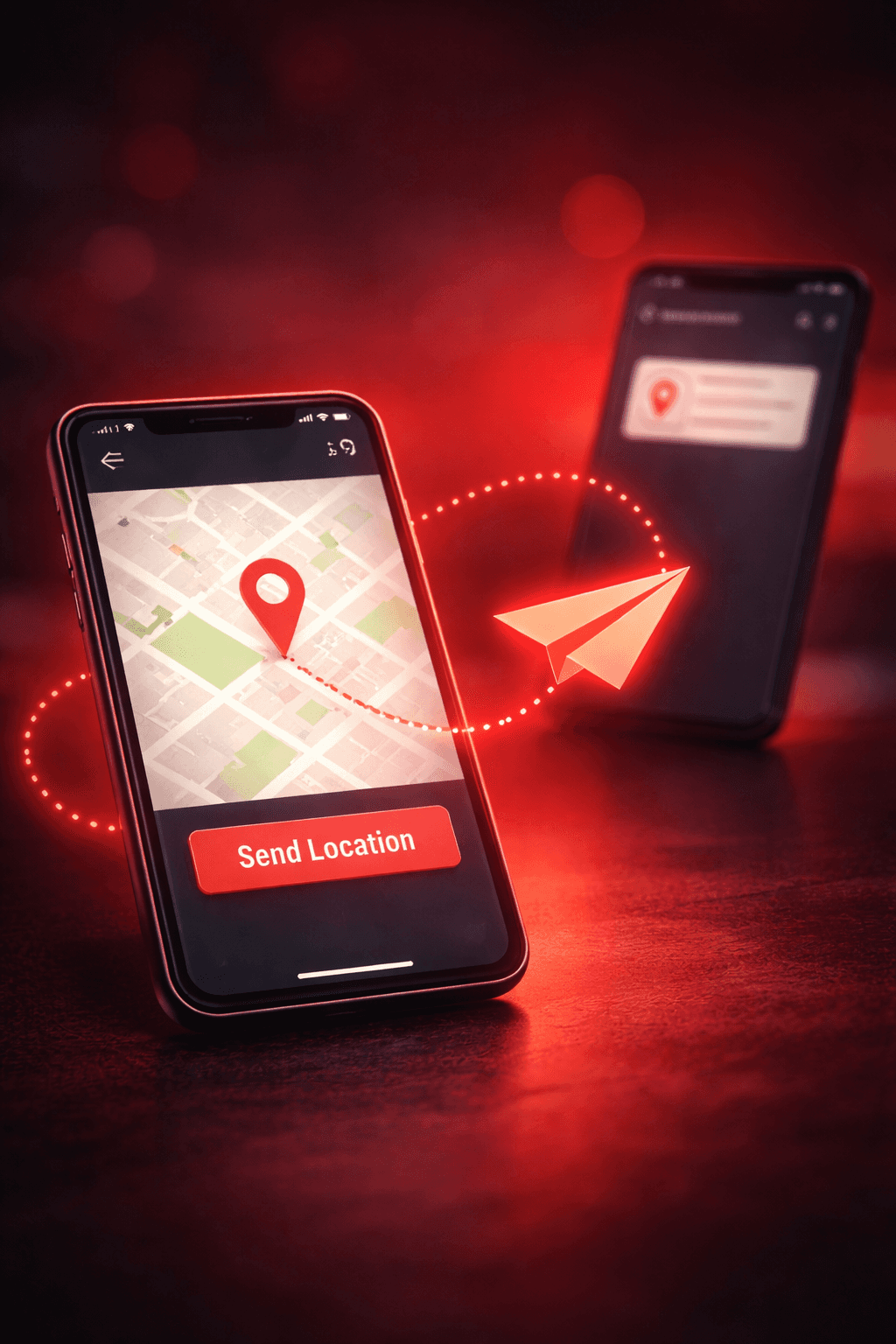
Someone ordering for a friend who wants to send their location without typing a paragraph of text.
02
The Designated Orderer
The friend or family member who always places the order for the group.
03
The Guest User
Someone ordering for a friend who wants to send their location without typing a paragraph of text.
01
The
Ecosystem
User
People who love both our brands (Domino's & Popeyes) but hate double-work.
02
The
Designated
Orderer
The friend or family member who always places the order for the group.
03
The
Guest
User
Someone ordering for a friend who wants to send their location without typing a paragraph of text.
01
The Ecosystem User
People who love both our brands (Domino's & Popeyes) but hate double-work.
SAYS
"Why do I have to type my home address again? I just ordered pizza last week!"
"Wait, let me close this app and check WhatsApp for the house number my mom sent."
"Can't I just send you a link to where I am?"
SAYS
"Why do I have to type my home address again? I just ordered pizza last week!"
"Wait, let me close this app and check WhatsApp for the house number my mom sent."
"Can't I just send you a link to where I am?"
THINKS
"This is annoying. I might just order from Swiggy because my address is already saved there."
"I hope I didn't make a typo in the pincode."
THINKS
"This is annoying. I might just order from Swiggy because my address is already saved there."
"I hope I didn't make a typo in the pincode."
DOES
Switches between apps to copy-paste address lines.
Takes screenshots of maps to explain locations to delivery riders.
Abandons cart because setting up a new profile takes too long.
DOES
Switches between apps to copy-paste address lines.
Takes screenshots of maps to explain locations to delivery riders.
Abandons cart because setting up a new profile takes too long.
FEELS
Frustrated by repetitive data entry.
Anxious about delivery errors due to typos.
Impatient when they are hungry and just want to checkout.
FEELS
Frustrated by repetitive data entry.
Anxious about delivery errors due to typos.
Impatient when they are hungry and just want to checkout.

Rohan
The "Group Coordinator"
Age : 24
Occupation : Software Developer
Hobbies : Watching movies, cricket
Favourite Brands : Amazon, Swiggy
Goals
Order food for 5 people quickly before the store closes.
Get the food delivered to his friend's new apartment (which he hasn't visited yet).
Avoid calling his friend 3 times to ask for landmarks.
Frustrations
Hates typing out long addresses manually.
His friends send vague locations like "Near the big banyan tree."
He uses both Domino's and Popeyes but hates setting up his profile twice.\
Rohan
The "Group Coordinator"
Age : 24
Occupation : Software Developer
Hobbies : Watching movies, cricket
Favourite Brands : Amazon, Swiggy
Goals
Order food for 5 people quickly before the store closes.
Get the food delivered to his friend's new apartment (which he hasn't visited yet).
Avoid calling his friend 3 times to ask for landmarks.
Frustrations
Hates typing out long addresses manually.
His friends send vague locations like "Near the big banyan tree."
He uses both Domino's and Popeyes but hates setting up his profile twice.
Rohan
The "Group Coordinator"
Age : 24
Occupation : Software Developer
Hobbies : Watching movies, cricket
Favourite Brands : Amazon, Swiggy
Goals
Order food for 5 people quickly before the store closes.
Get the food delivered to his friend's new apartment (which he hasn't visited yet).
Avoid calling his friend 3 times to ask for landmarks.
Frustrations
Hates typing out long addresses manually.
His friends send vague locations like "Near the big banyan tree."
He uses both Domino's and Popeyes but hates setting up his profile twice.\
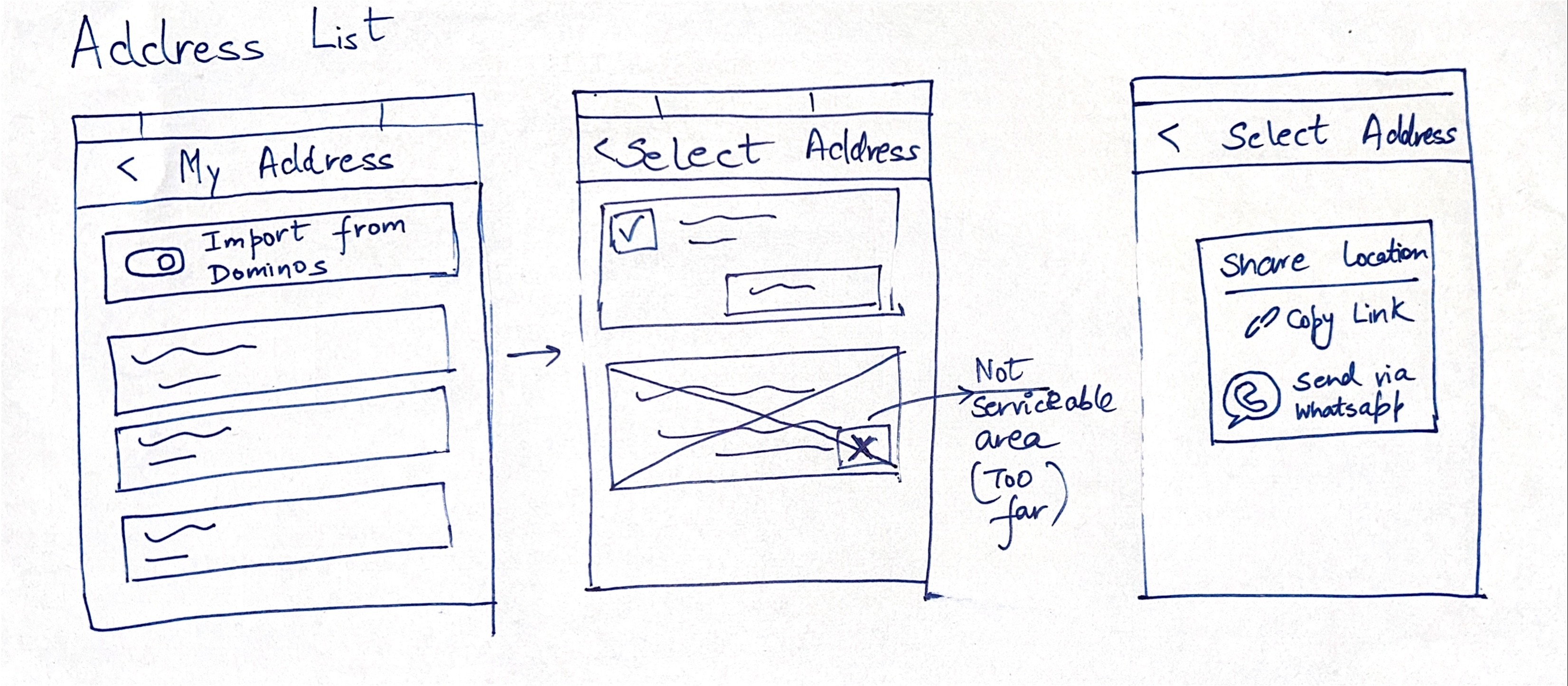
Leveraging our existing Design System,
I prototyped directly in high fidelity.
This allowed me to test the
logic immediately against real-world constraints.
Share & Save address
Share & Save address
Share & Save address
Profile Menu
Profile Menu
Profile Menu
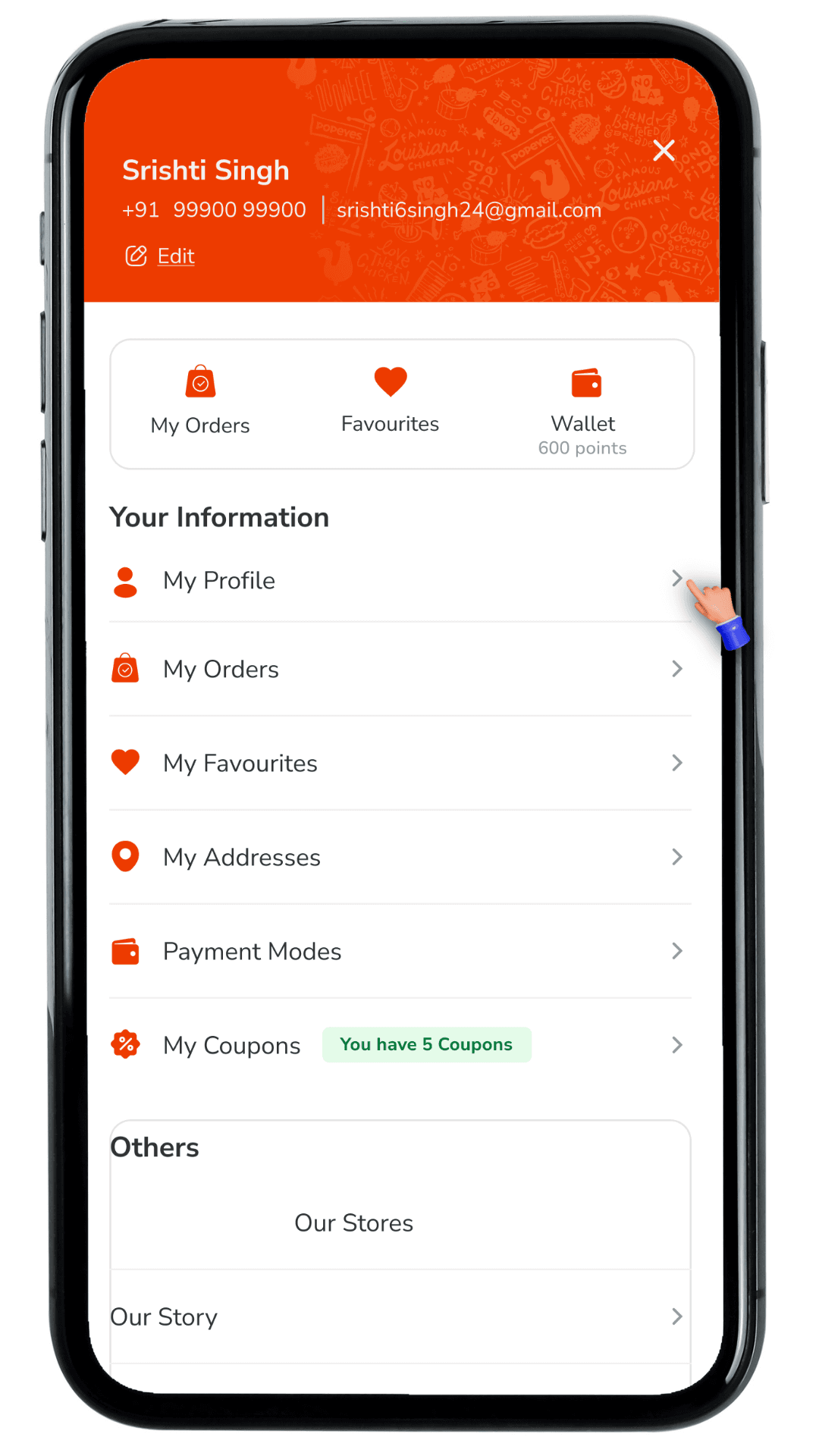
Share address directly
Share address directly
Share address directly
My Addresses
My Addresses
My Addresses
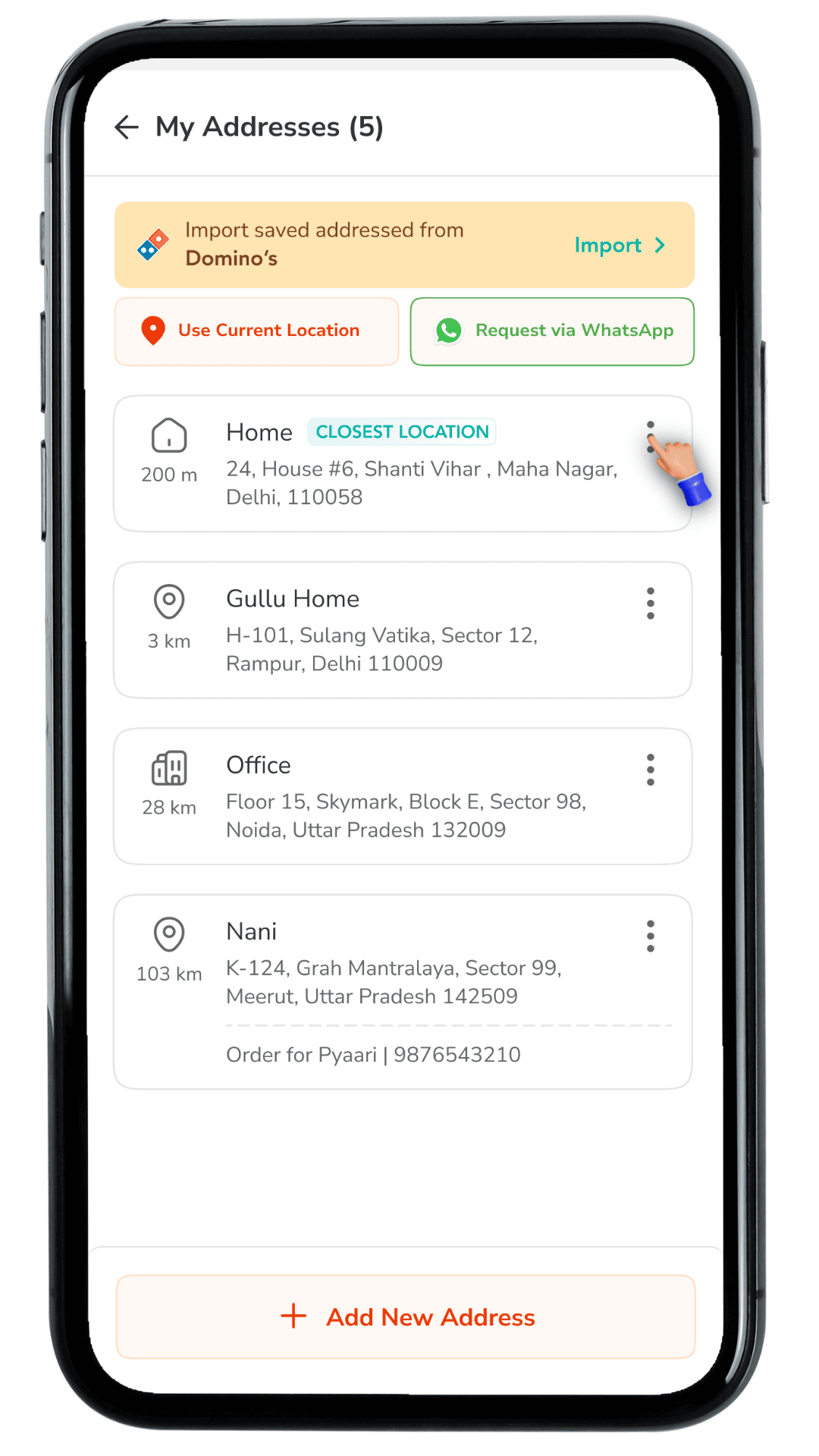
My Addresses & Import from Domino's
My Addresses & Import from Domino's
Add, edit and share
Add, edit and share
WhatsApp UI
WhatsApp UI
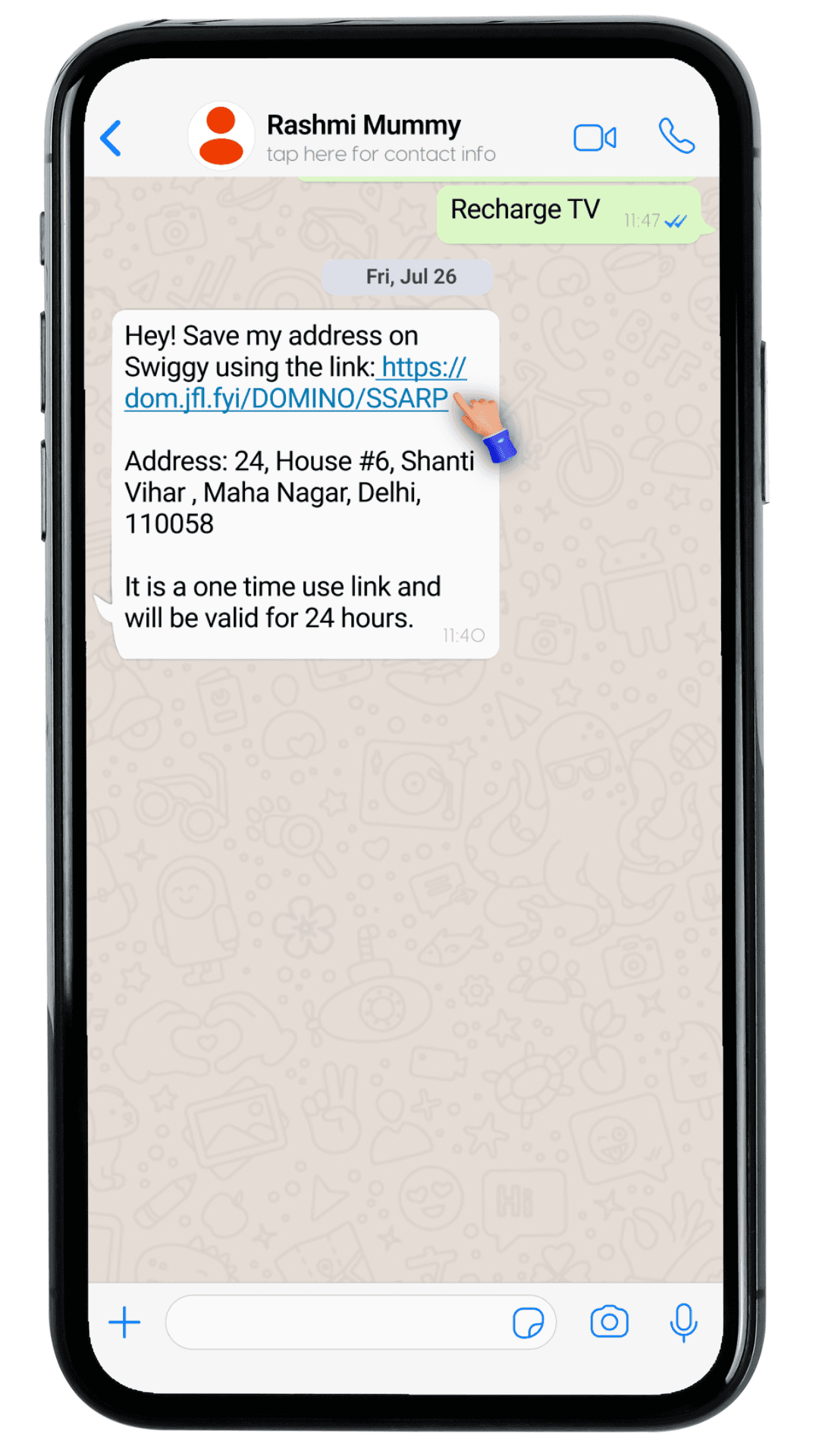
Address link shared via message on WhatsApp
Address link shared via message on WhatsApp
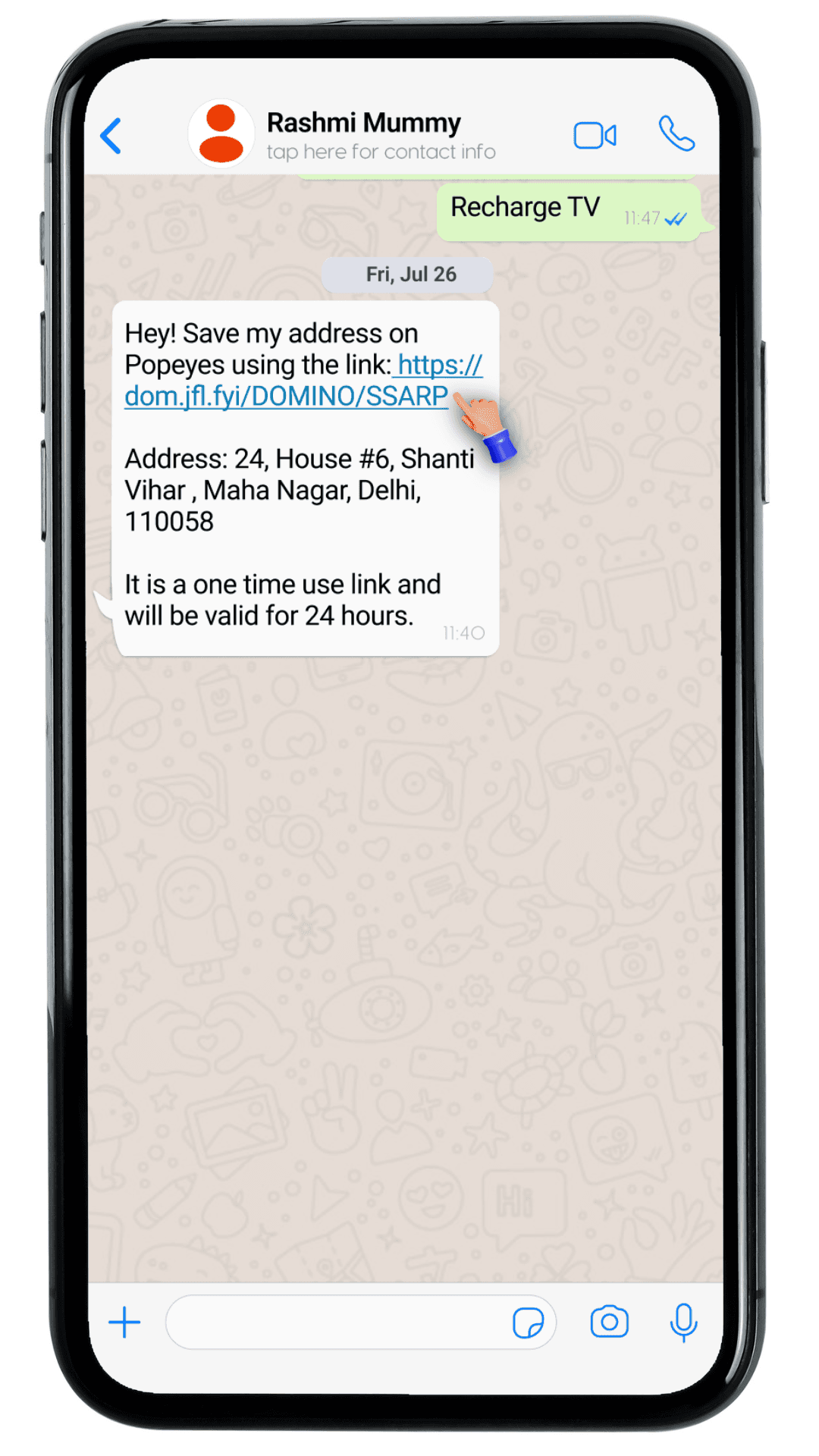
My Addresses & Import from Domino's option
Add, edit and share
WhatsApp UI
Address link shared via message on WhatsApp
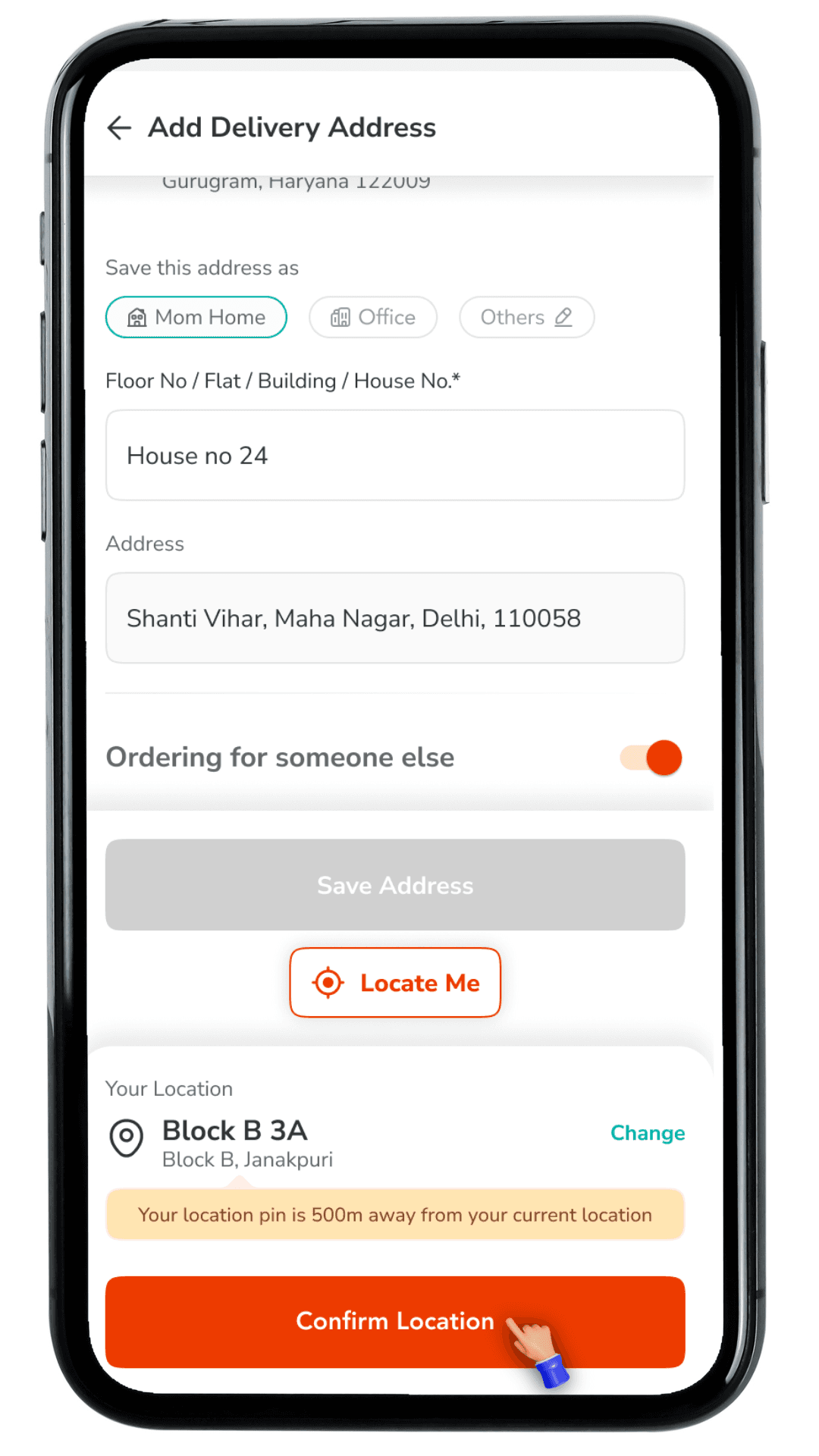
Address form
Address form
Address form
Pre-filled already, asking for location confirmation
Pre-filled already, asking for location confirmation
Pre-filled already, asking for location confirmation
Share address directly
Share address directly
Share address directly
Save address
Save address
Save address
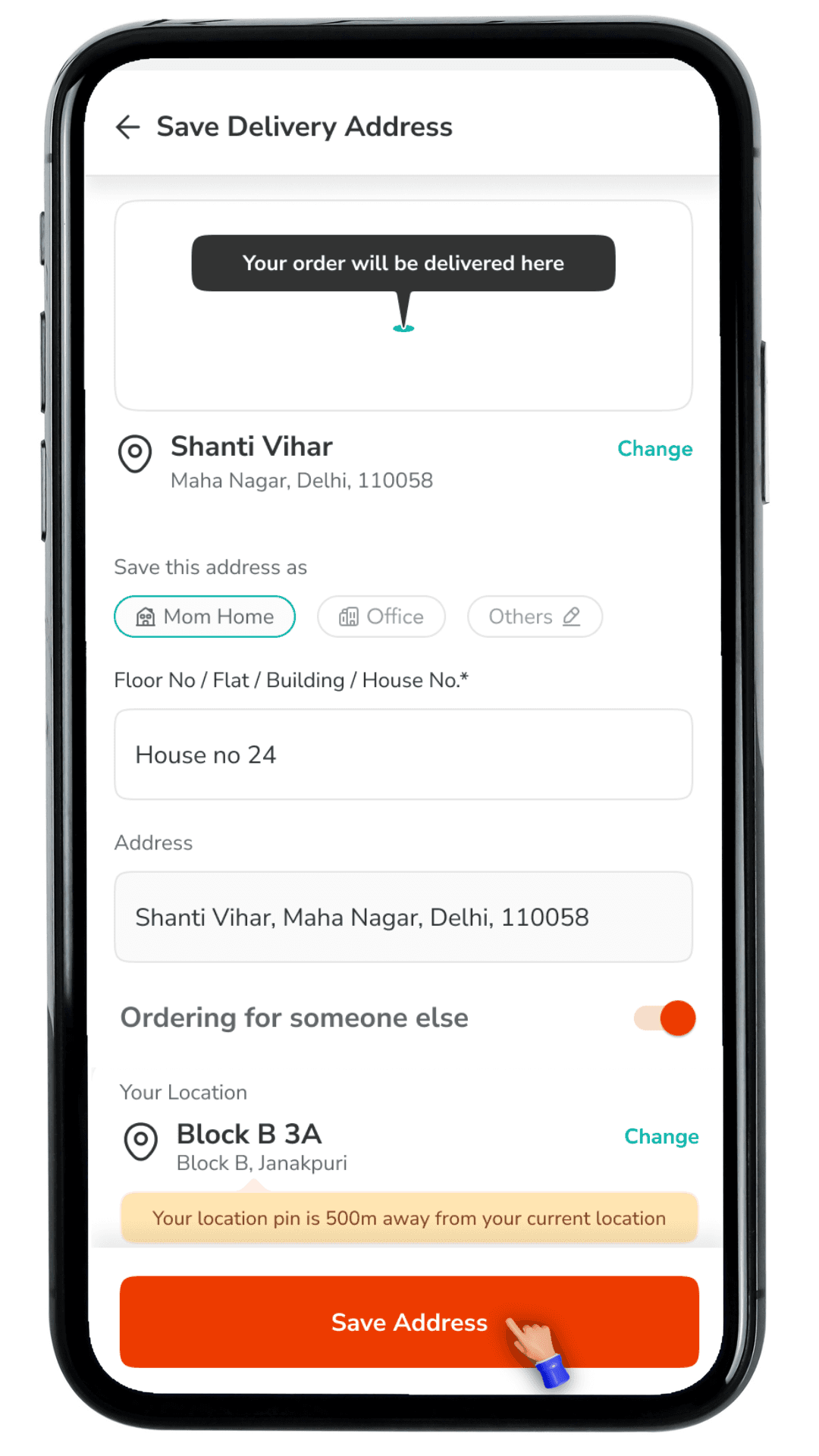
My Addresses & Import from Domino's
My Addresses & Import from Domino's
Shared address saved successfully
Shared address saved successfully
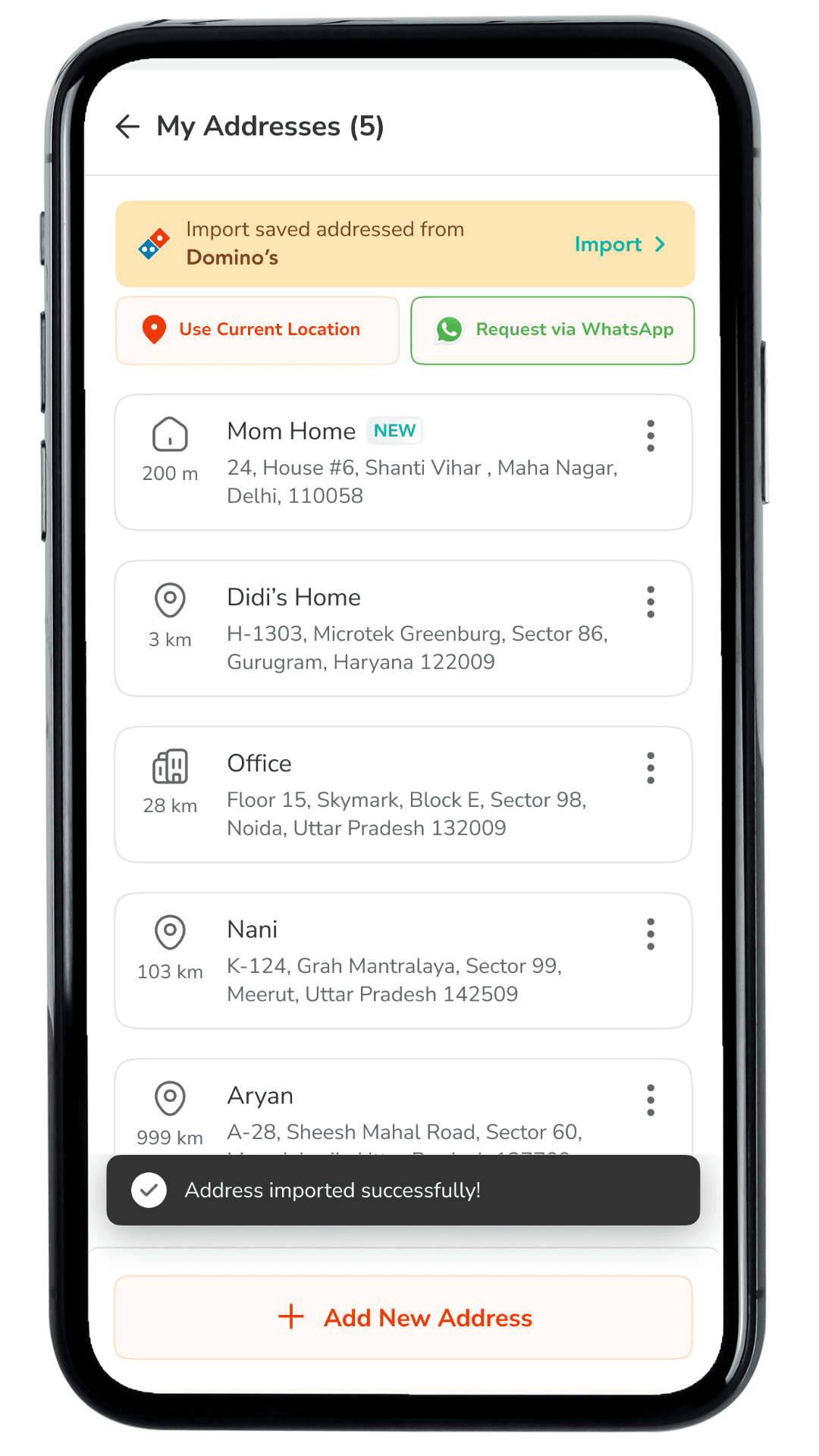
WhatsApp UI
WhatsApp UI
Order placed successfully
Order placed successfully
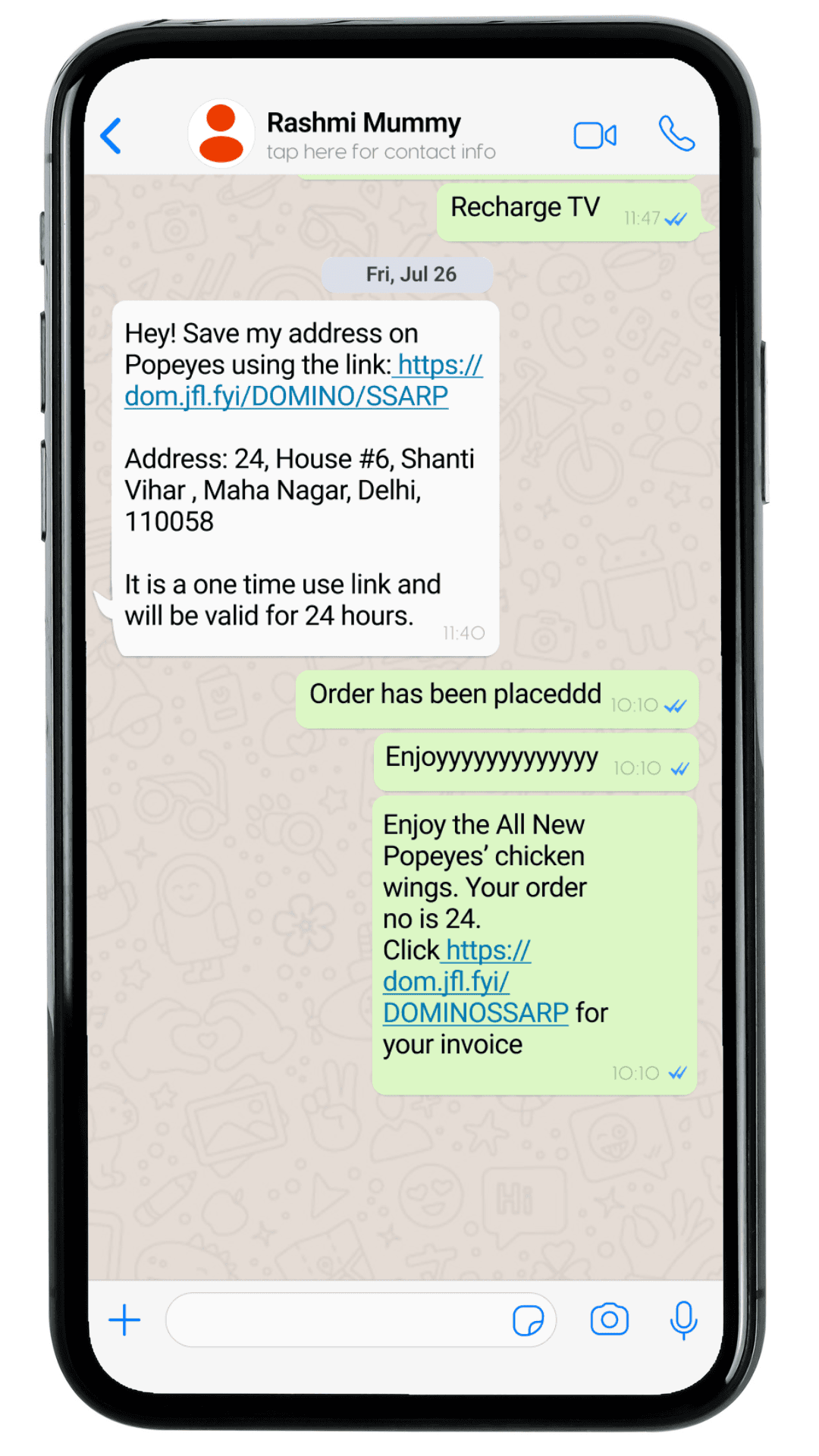
My Addresses & Import from Domino's option
Shared address saved successfully
WhatsApp UI
Order placed successfully
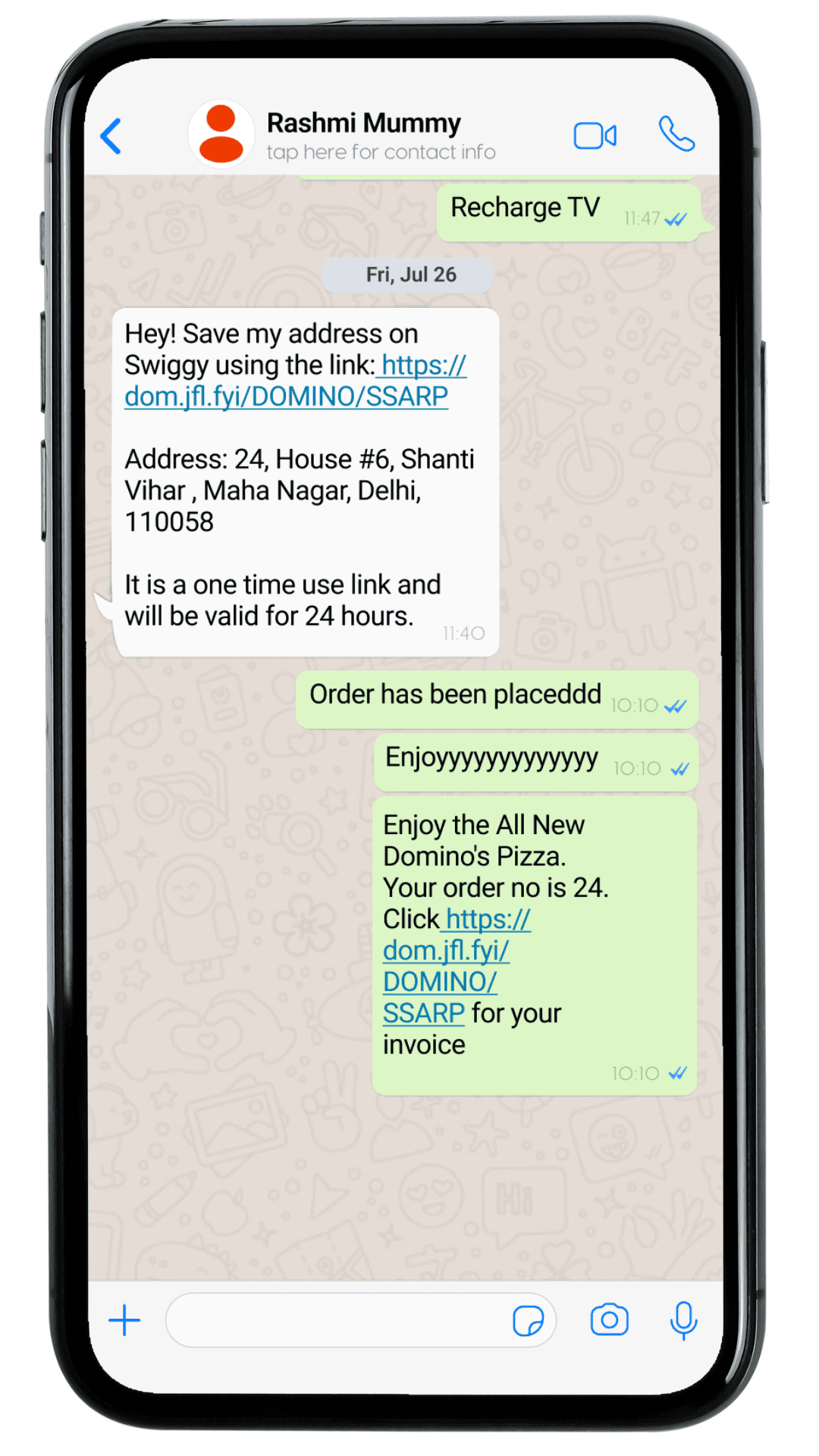
Ask for Address
Ask for Address
Ask for Address
via WhatsApp
via WhatsApp
via WhatsApp
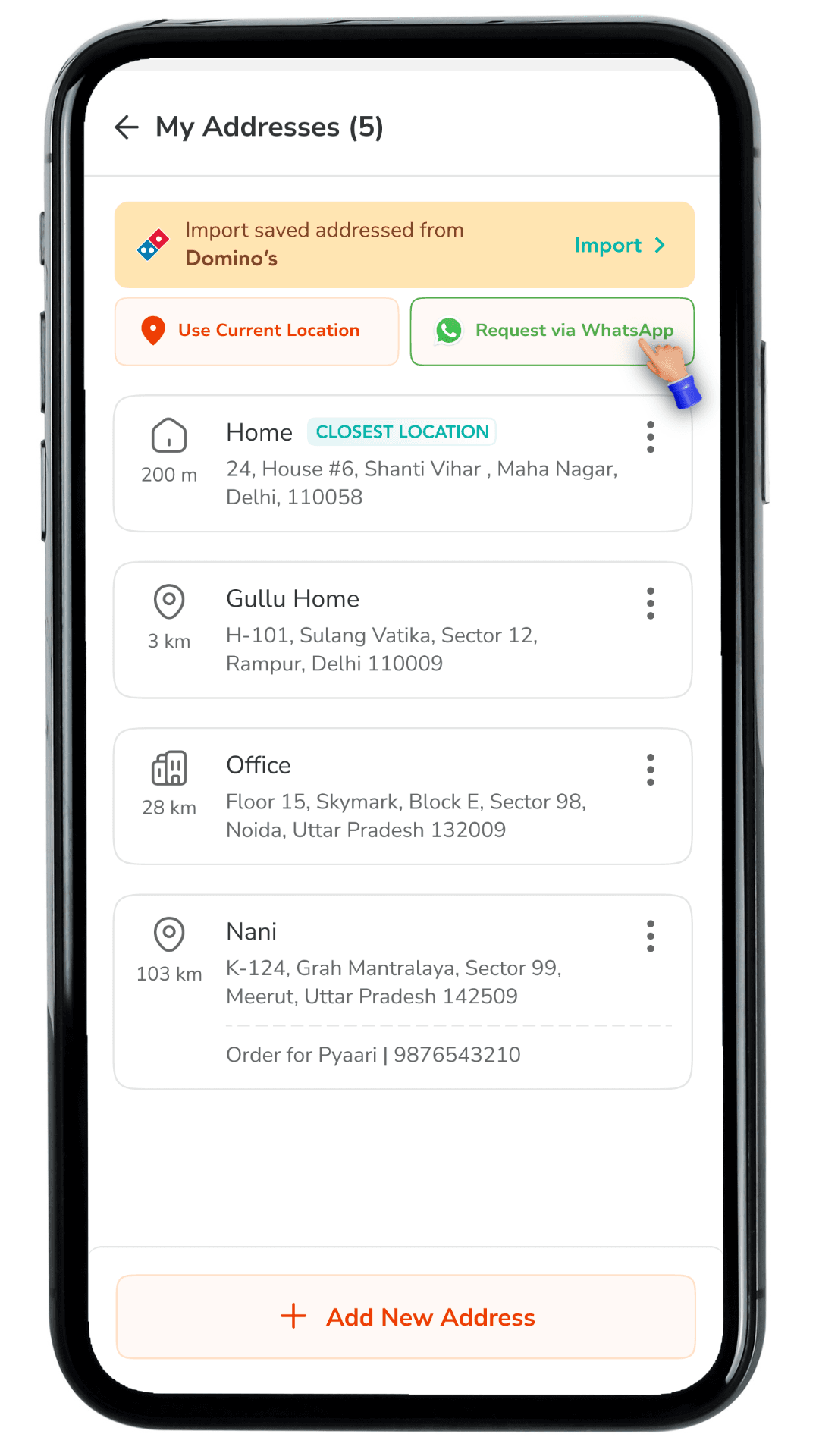
Share address directly
Share address directly
Share address directly
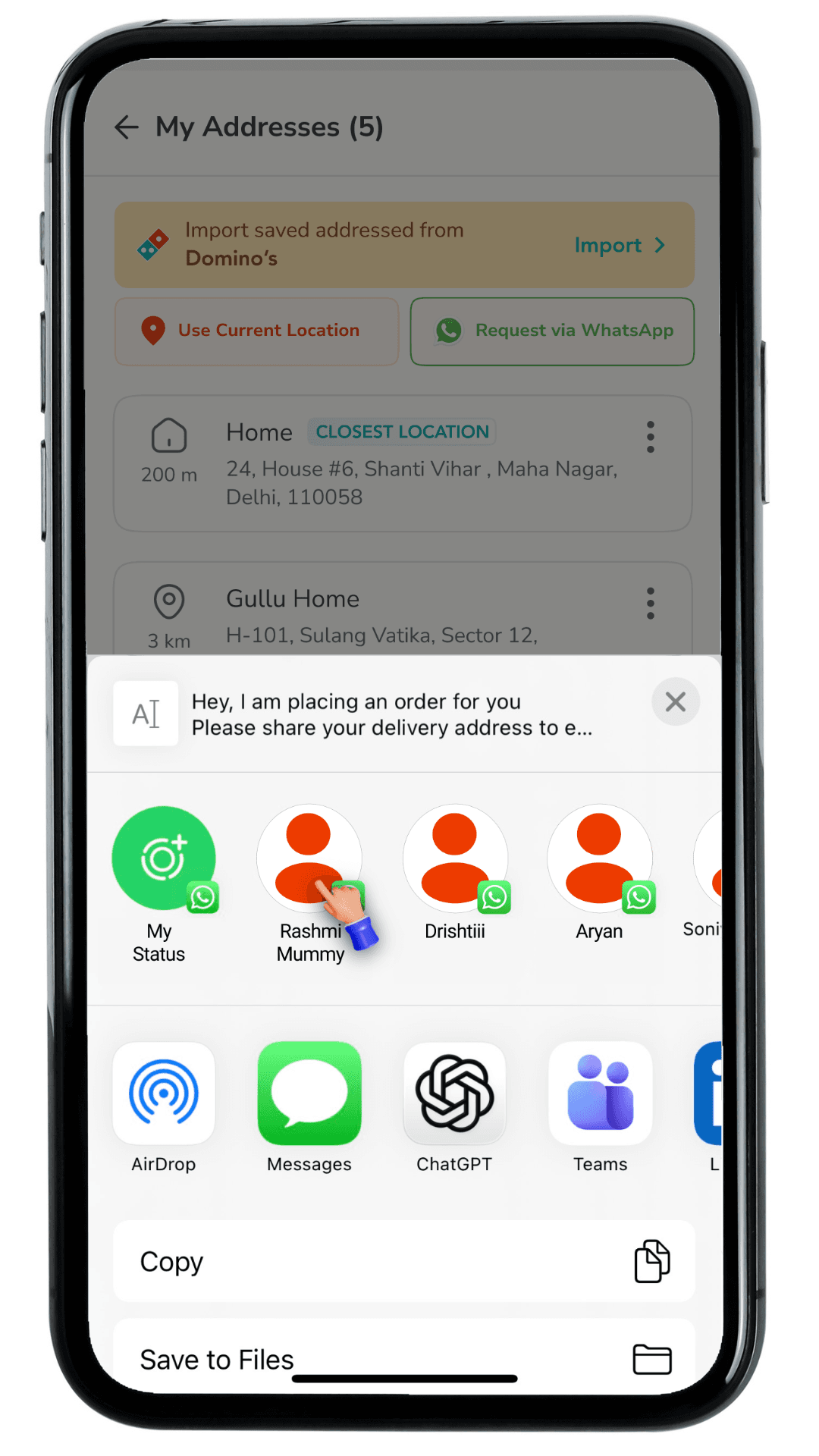
Selection of contact
Selection of contact
Selection of contact
My Addresses & Import from Domino's
My Addresses & Import from Domino's
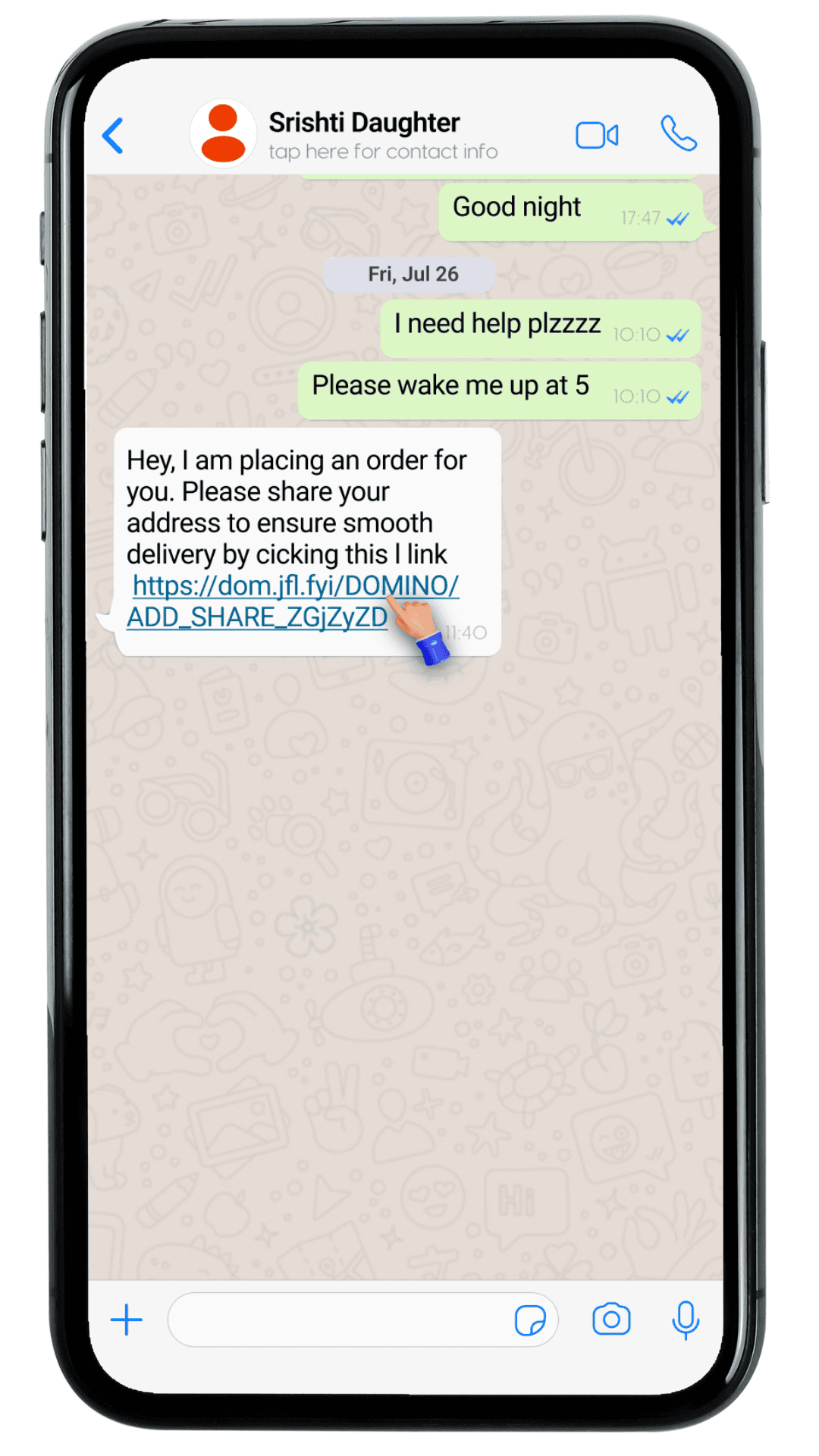
Address linked shared on WhatsApp
Address linked shared on WhatsApp
User 2
User 2
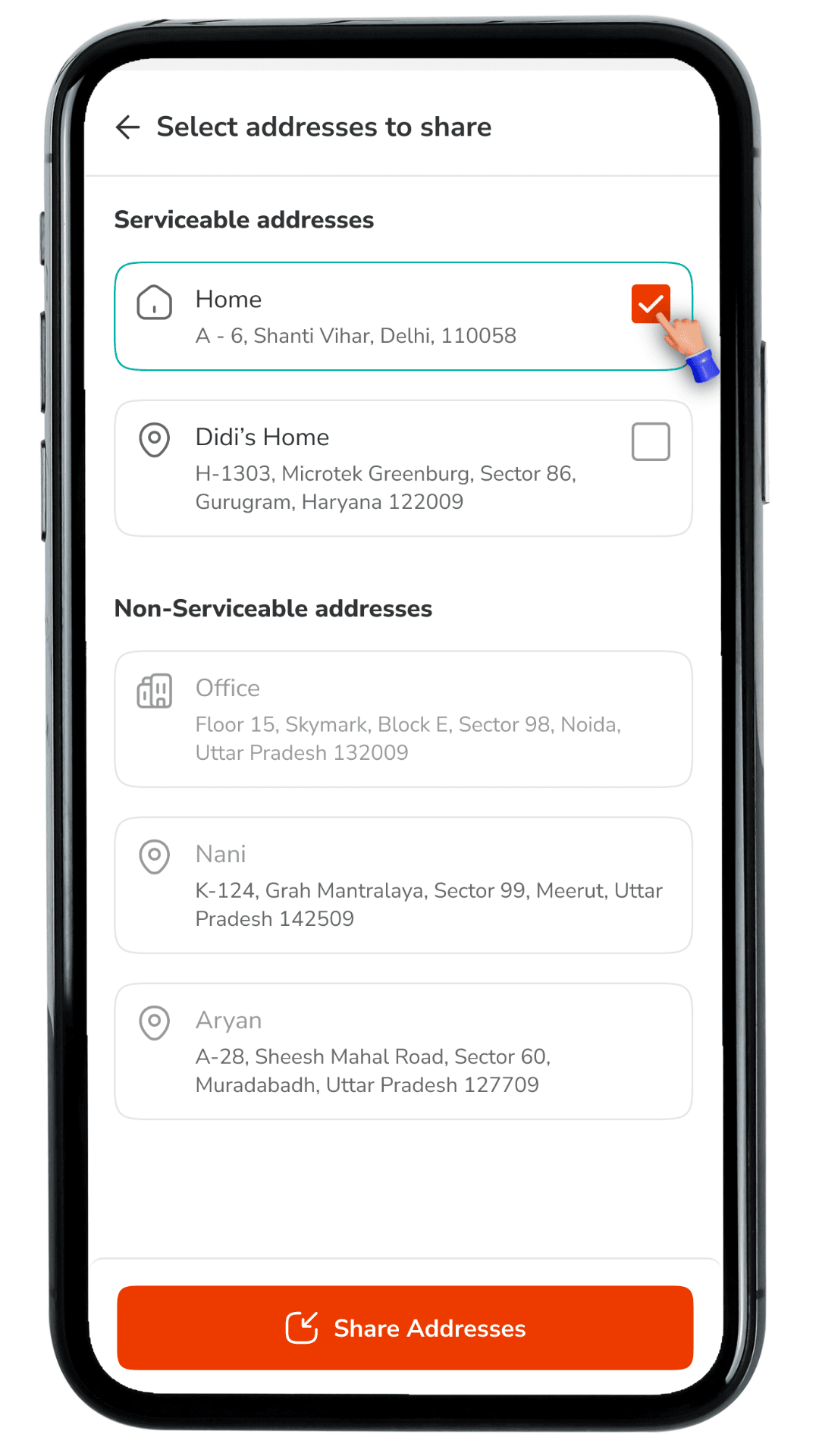
Address link opened to select one of the saved address
Address link opened to select one of the saved address
My Addresses & Import from Domino's option
Add, edit and share
WhatsApp UI
Address link shared via message on WhatsApp
Address selected and shared successfully
Address selected and shared successfully
Address selected and shared successfully
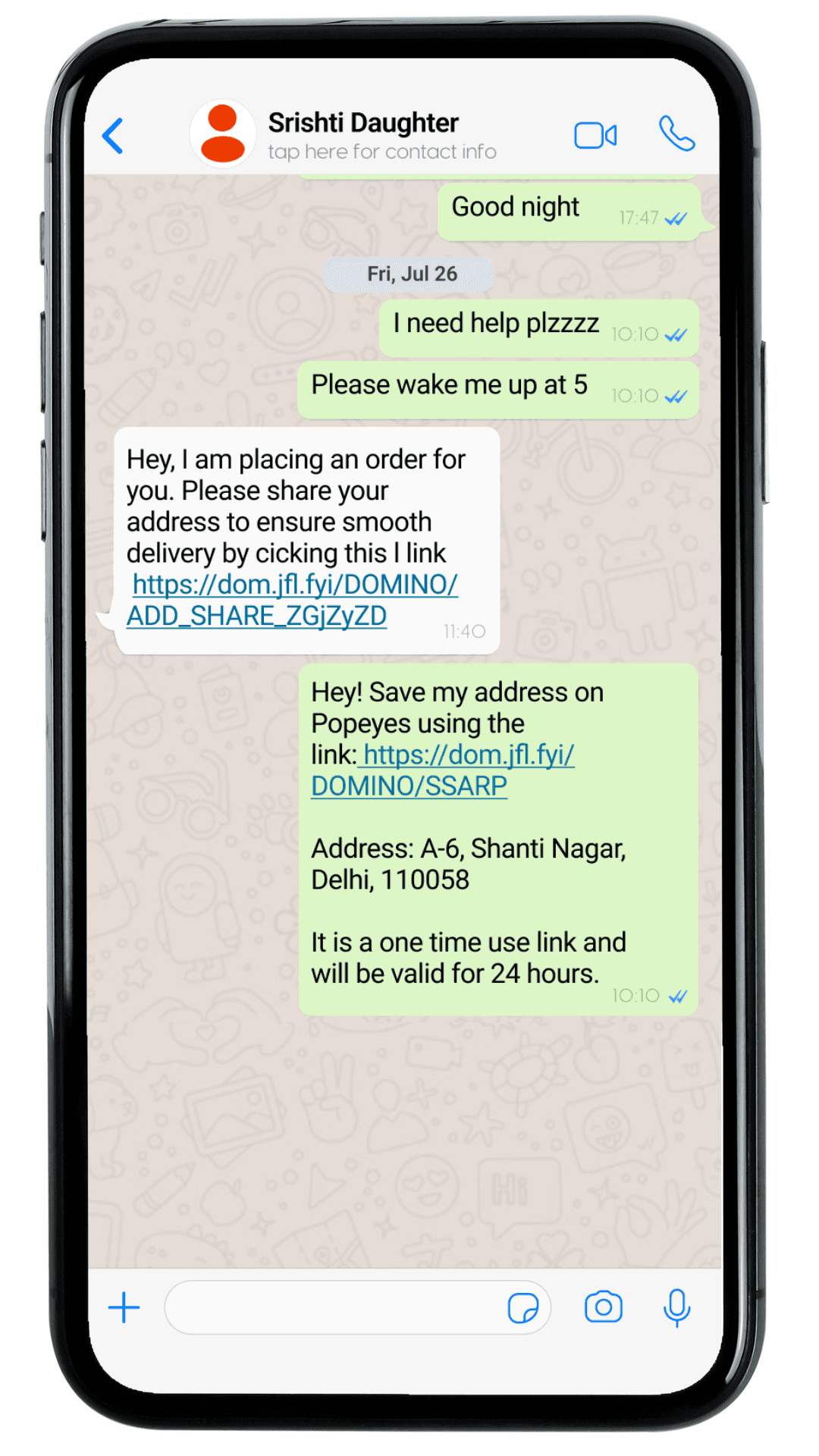
Share address directly
Share address directly
Share address directly
Order placed
Order placed and Happy customer achieved
Order placed
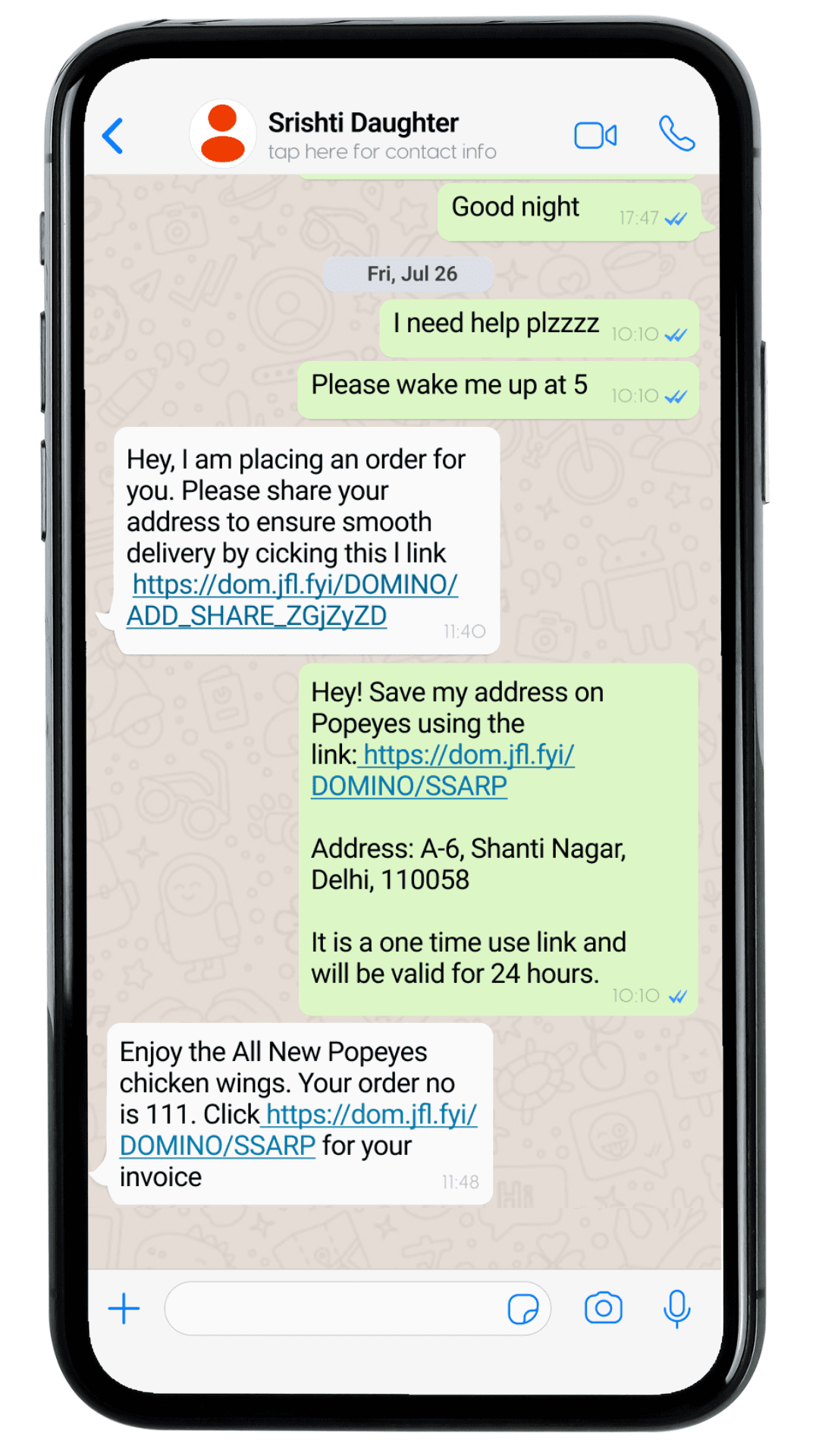
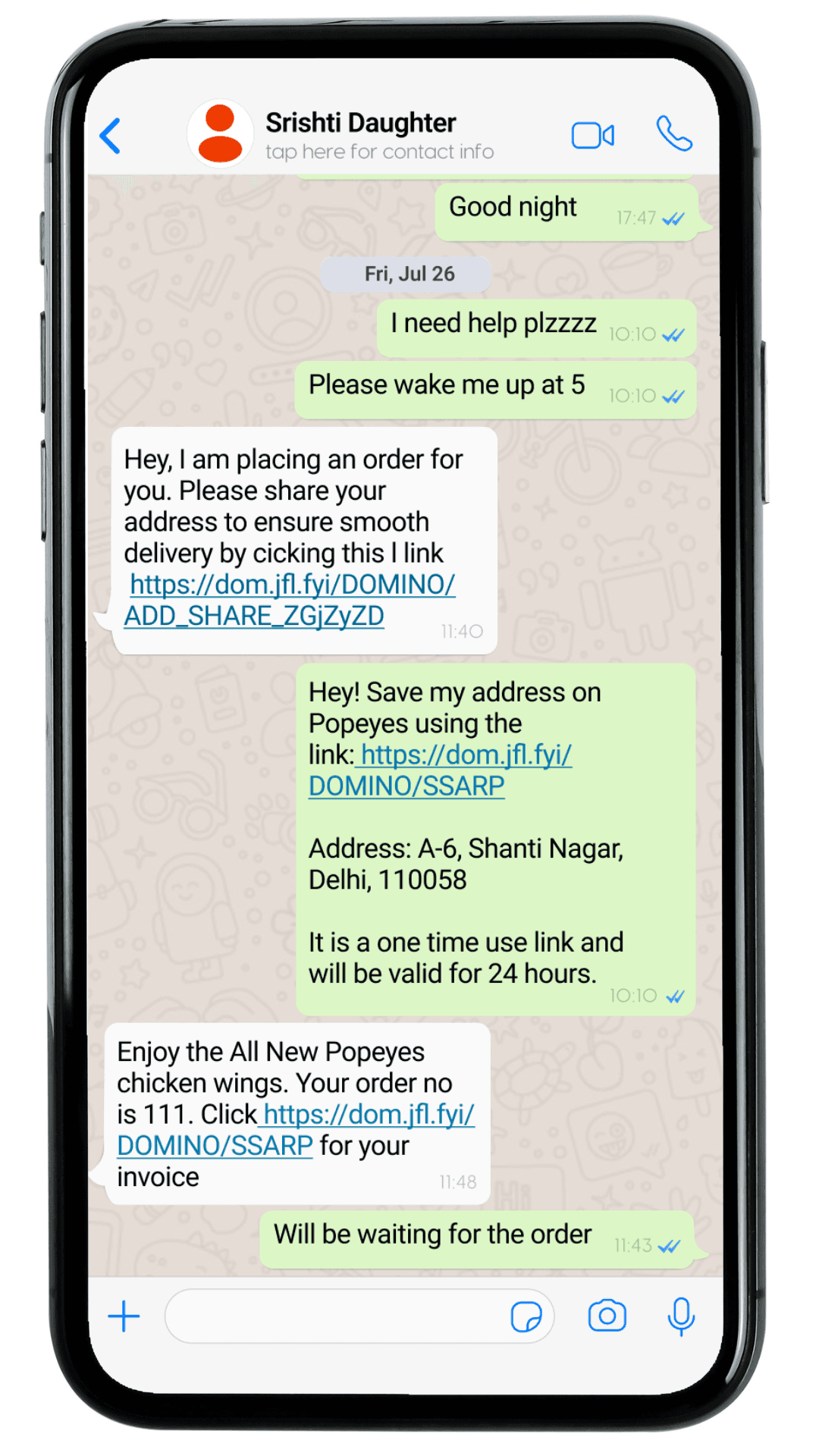
My Addresses & Import from Domino's
My Addresses & Import from Domino's
Happy customer
Happy customer
Import from Dominos
Import from Dominos
Import from Dominos
Address book
Address book
Address book
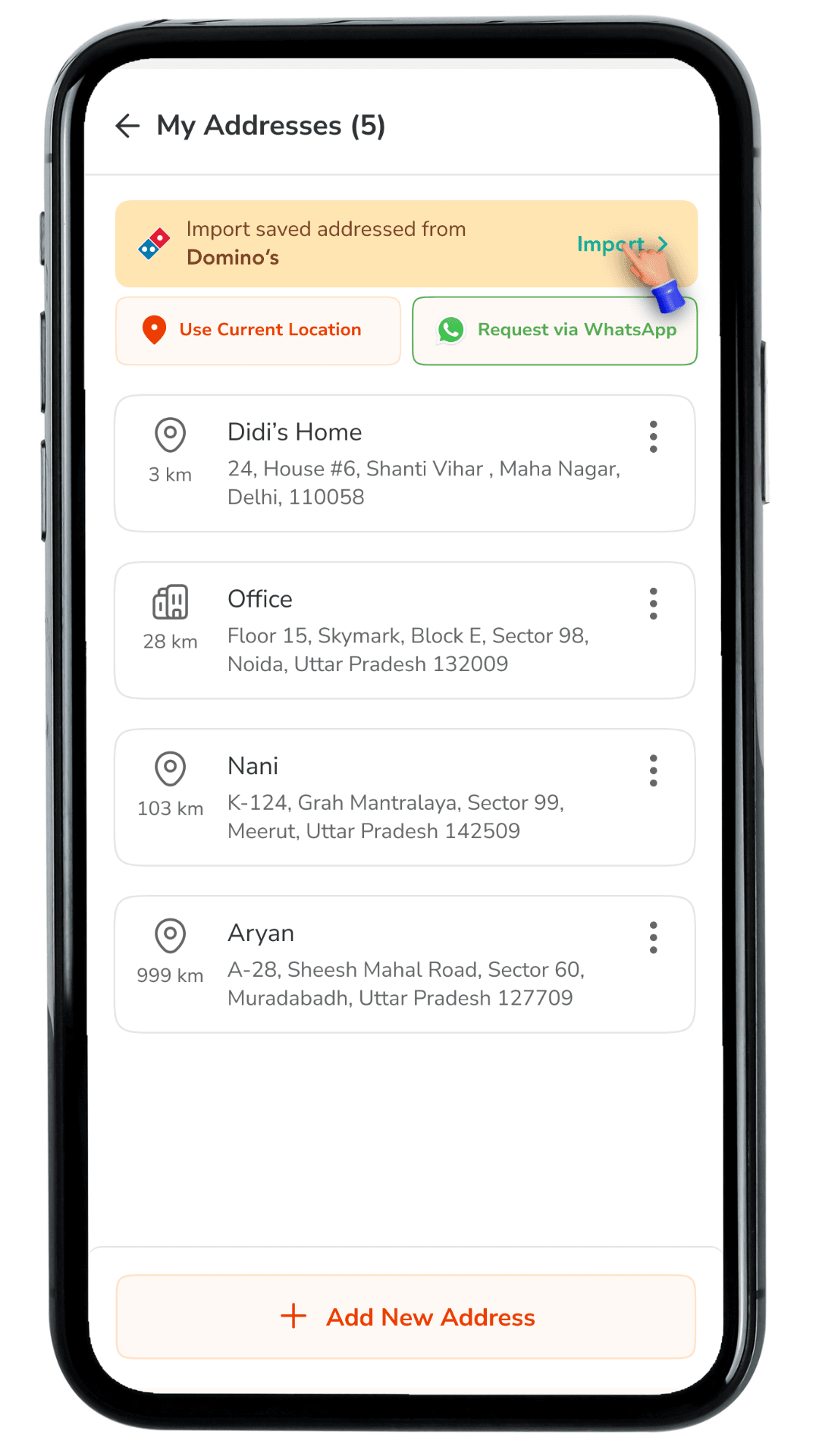
Share address directly
Share address directly
Share address directly
Import screen
Import screen
Import screen
My Addresses & Import from Domino's
My Addresses & Import from Domino's
Address selected
Address selected
User 2
User 2
Address imported
Address imported
My Addresses & Import from Domino's option
Add, edit and share
WhatsApp UI
Address link shared via message on WhatsApp
No addresses to import
No addresses to import
No addresses to import
Guest User
Guest User
Guest User
Guest user 1st time
Guest user 1st time
Guest user 1st time
Share address directly
Share address directly
Share address directly
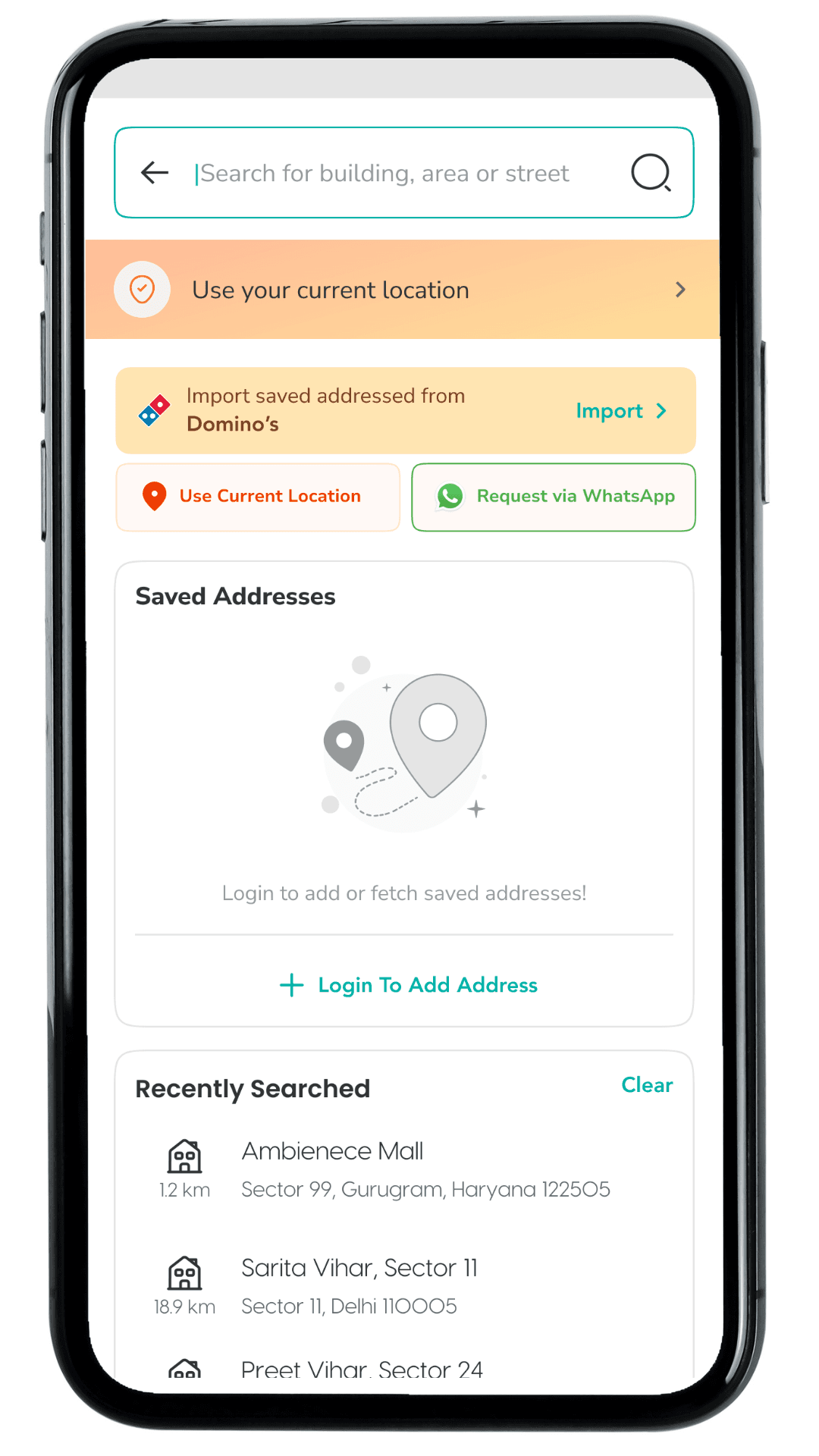
Guest user with search history
Guest user with search history
Guest user with search history
No Addresses
No Addresses
My Addresses
My Addresses
User 2
User 2
Loading State
Loading State
My Addresses & Import from Domino's option
Add, edit and share
WhatsApp UI
Address link shared via message on WhatsApp
Interface designs built upon and adapted from the current Popeyes app to demonstrate updated user flows
Interface designs built upon and adapted from the current Popeyes app to demonstrate updated user flows
Interface designs built upon and adapted from the current Popeyes app to demonstrate updated user flows
Unified
Address
Experience
Duration : 4 Weeks
Role: Product Designer, UX Researcher, Frontend Development
Brands: Dominos, Popeyes, Hongs Kitchen
2025
May
Jubilant runs multiple consumer food brands across separate apps (Domino’s, Popeyes, Hong's Kitchen and Dunkin' Donuts ).
Users frequently order for family or friends and also switch between brands. However, addresses saved in one brand do not carry over to another, and there is no simple way to share an address quickly with someone else.
As a result, users must re-enter the same address details repeatedly, especially when trying a new brand app. This increases checkout time, creates avoidable address errors, and can lead to order drop-offs at a high-intent stage.
Address setup becomes repetitive
Checkout slows down at the address step
Sharing addresses is manual and error-prone
Addresses cannot be transferred across brands
Re-entry increases address mistakes
Addresses cannot be transferred across brands
Sharing addresses is manual and error-prone
Checkout slows down at the address step
Address setup becomes repetitive
Addresses cannot be transferred across brands
Sharing addresses is manual and error-prone
Checkout slows down at the address step
Address setup becomes repetitive
Addresses cannot be transferred across brands
Sharing addresses is manual and error-prone
Checkout slows down at the address step
Address setup becomes repetitive
Addresses cannot be transferred across brands
Sharing addresses is manual and error-prone
Checkout slows down at the address step
Address setup becomes repetitive
Address setup becomes repetitive
Checkout slows down at the address step
Sharing addresses is manual and error-prone
Addresses cannot be transferred across brands
Re-entry increases address mistakes
Cross-brand friction: Users installing a new Jubilant app must manually add addresses again.
Ordering for others: Sharing an address over chat is manual and error-prone.
High-intent failure point: Address entry happens near checkout, so friction directly impacts conversion.
Trust and accuracy: Incorrect addresses can cause delivery delays, failed deliveries, and user frustration.
How we might help users reuse and share delivery addresses across Jubilant brand apps so ordering becomes
faster, more accurate, and more convenient,
especially during checkout?
To reduce address friction at checkout and make cross-brand ordering effortless, we introduced a unified address experience with the following solutions:
Import Saved Addresses from Domino’s
Add an entry point inside My Addresses and the Select an Address bottom sheet so users can import their Domino’s saved addresses without re-entering details. This supports first-time users of a new Jubilant brand app and speeds up address setup at the highest-intent stage.
Import screen with “Serviceable” vs “Non-serviceable”
Create a dedicated Import addresses from Domino’s screen that clearly separates addresses into Serviceable (eligible to import and use immediately) and Non-serviceable (shown for reference but not selectable). This prevents failed checkouts and makes it instantly clear which addresses will work for the user’s current ordering context.
Import screen with “Serviceable” vs “Non-serviceable”
Create a dedicated Import addresses from Domino’s screen that clearly separates addresses into Serviceable (eligible to import and use immediately) and Non-serviceable (shown for reference but not selectable). This prevents failed checkouts and makes it instantly clear which addresses will work for the user’s current ordering context.
Selection-based import with clear CTA
Allow users to select one or more addresses and enable the CTA only when a valid selection is made. The Import Addresses button stays disabled by default to avoid accidental imports and guide the user through a clean, predictable action.
Trust-building states and confirmations
Build trust with complete system states: Loading shimmer while fetching saved addresses, Empty state when nothing is available to import And a success confirmation with the imported address highlighted (NEW tag) so the outcome is instantly visible.
Target Audience
01
The Ecosystem User
People who love both our brands (Domino's & Popeyes) but hate double-work.
02
The Designated Orderer
The friend or family member who always places the order for the group.
03
The Guest User
Someone ordering for a friend who wants to send their location without typing a paragraph of text.
02
The Designated Orderer
The friend or family member who always places the order for the group.
03
The Guest User
Someone ordering for a friend who wants to send their location without typing a paragraph of text.
01
The
Ecosystem
User
People who love both our brands (Domino's & Popeyes) but hate double-work.
02
The
Designated
Orderer
The friend or family member who always places the order for the group.
03
The
Guest
User
Someone ordering for a friend who wants to send their location without typing a paragraph of text.
01
The Ecosystem User
People who love both our brands (Domino's & Popeyes) but hate double-work.
SAYS
"Why do I have to type my home address again? I just ordered pizza last week!"
"Wait, let me close this app and check WhatsApp for the house number my mom sent."
"Can't I just send you a link to where I am?"
SAYS
"Why do I have to type my home address again? I just ordered pizza last week!"
"Wait, let me close this app and check WhatsApp for the house number my mom sent."
"Can't I just send you a link to where I am?"
THINKS
"This is annoying. I might just order from Swiggy because my address is already saved there."
"I hope I didn't make a typo in the pincode."
THINKS
"This is annoying. I might just order from Swiggy because my address is already saved there."
"I hope I didn't make a typo in the pincode."
DOES
Switches between apps to copy-paste address lines.
Takes screenshots of maps to explain locations to delivery riders.
Abandons cart because setting up a new profile takes too long.
DOES
Switches between apps to copy-paste address lines.
Takes screenshots of maps to explain locations to delivery riders.
Abandons cart because setting up a new profile takes too long.
FEELS
Frustrated by repetitive data entry.
Anxious about delivery errors due to typos.
Impatient when they are hungry and just want to checkout.
FEELS
Frustrated by repetitive data entry.
Anxious about delivery errors due to typos.
Impatient when they are hungry and just want to checkout.
Rohan
The "Group Coordinator"
Age : 24
Occupation : Software Developer
Hobbies : Watching movies, cricket
Favourite Brands : Amazon, Swiggy
Goals
Order food for 5 people quickly before the store closes.
Get the food delivered to his friend's new apartment (which he hasn't visited yet).
Avoid calling his friend 3 times to ask for landmarks.
Frustrations
Hates typing out long addresses manually.
His friends send vague locations like "Near the big banyan tree."
He uses both Domino's and Popeyes but hates setting up his profile twice.\
Rohan
The "Group Coordinator"
Age : 24
Occupation : Software Developer
Hobbies : Watching movies, cricket
Favourite Brands : Amazon, Swiggy
Goals
Order food for 5 people quickly before the store closes.
Get the food delivered to his friend's new apartment (which he hasn't visited yet).
Avoid calling his friend 3 times to ask for landmarks.
Frustrations
Hates typing out long addresses manually.
His friends send vague locations like "Near the big banyan tree."
He uses both Domino's and Popeyes but hates setting up his profile twice.
Rohan
The "Group Coordinator"
Age : 24
Occupation : Software Developer
Hobbies : Watching movies, cricket
Favourite Brands : Amazon, Swiggy
Goals
Order food for 5 people quickly before the store closes.
Get the food delivered to his friend's new apartment (which he hasn't visited yet).
Avoid calling his friend 3 times to ask for landmarks.
Frustrations
Hates typing out long addresses manually.
His friends send vague locations like "Near the big banyan tree."
He uses both Domino's and Popeyes but hates setting up his profile twice.\
Leveraging our existing Design System,
I prototyped directly in high fidelity.
This allowed me to test the
logic immediately against real-world constraints.
Share & Save address
Share & Save address
Share & Save address
Profile Menu
Profile Menu
Profile Menu
Share address directly
Share address directly
Share address directly
My Addresses
My Addresses
My Addresses
My Addresses & Import from Domino's
My Addresses & Import from Domino's
Add, edit and share
Add, edit and share
WhatsApp UI
WhatsApp UI
Address link shared via message on WhatsApp
Address link shared via message on WhatsApp
My Addresses & Import from Domino's option
Add, edit and share
WhatsApp UI
Address link shared via message on WhatsApp
Address form
Address form
Address form
Pre-filled already, asking for location confirmation
Pre-filled already, asking for location confirmation
Pre-filled already, asking for location confirmation
Share address directly
Share address directly
Share address directly
Save address
Save address
Save address
My Addresses & Import from Domino's
My Addresses & Import from Domino's
Shared address saved successfully
Shared address saved successfully
WhatsApp UI
WhatsApp UI
Order placed successfully
Order placed successfully
My Addresses & Import from Domino's option
Shared address saved successfully
WhatsApp UI
Order placed successfully
Ask for Address
Ask for Address
Ask for Address
via WhatsApp
via WhatsApp
via WhatsApp
Share address directly
Share address directly
Share address directly
Selection of contact
Selection of contact
Selection of contact
My Addresses & Import from Domino's
My Addresses & Import from Domino's
Address linked shared on WhatsApp
Address linked shared on WhatsApp
User 2
User 2
Address link opened to select one of the saved address
Address link opened to select one of the saved address
My Addresses & Import from Domino's option
Add, edit and share
WhatsApp UI
Address link shared via message on WhatsApp
Address selected and shared successfully
Address selected and shared successfully
Address selected and shared successfully
Share address directly
Share address directly
Share address directly
Order placed
Order placed and Happy customer achieved
Order placed
My Addresses & Import from Domino's
My Addresses & Import from Domino's
Happy customer
Happy customer
Import from Dominos
Import from Dominos
Import from Dominos
Address book
Address book
Address book
Share address directly
Share address directly
Share address directly
Import screen
Import screen
Import screen
My Addresses & Import from Domino's
My Addresses & Import from Domino's
Address selected
Address selected
User 2
User 2
Address imported
Address imported
My Addresses & Import from Domino's option
Add, edit and share
WhatsApp UI
Address link shared via message on WhatsApp
No addresses to import
No addresses to import
No addresses to import
Guest User
Guest User
Guest User
Guest user 1st time
Guest user 1st time
Guest user 1st time
Share address directly
Share address directly
Share address directly
Guest user with search history
Guest user with search history
Guest user with search history
No Addresses
No Addresses
My Addresses
My Addresses
User 2
User 2
Loading State
Loading State
My Addresses & Import from Domino's option
Add, edit and share
WhatsApp UI
Address link shared via message on WhatsApp
Interface designs built upon and adapted from the current Popeyes app to demonstrate updated user flows
Interface designs built upon and adapted from the current Popeyes app to demonstrate updated user flows
Interface designs built upon and adapted from the current Popeyes app to demonstrate updated user flows
Unified
Address
Experience
Duration : 4 Weeks
Role: Product Designer, UX Researcher, Frontend Development
Brands: Dominos, Popeyes, Hongs Kitchen
2025
May
Jubilant runs multiple consumer food brands across separate apps (Domino’s, Popeyes, Hong's Kitchen and Dunkin' Donuts ).
Users frequently order for family or friends and also switch between brands. However, addresses saved in one brand do not carry over to another, and there is no simple way to share an address quickly with someone else.
As a result, users must re-enter the same address details repeatedly, especially when trying a new brand app. This increases checkout time, creates avoidable address errors, and can lead to order drop-offs at a high-intent stage.
Address setup becomes repetitive
Checkout slows down at the address step
Sharing addresses is manual and error-prone
Addresses cannot be transferred across brands
Re-entry increases address mistakes
Addresses cannot be transferred across brands
Sharing addresses is manual and error-prone
Checkout slows down at the address step
Address setup becomes repetitive
Addresses cannot be transferred across brands
Sharing addresses is manual and error-prone
Checkout slows down at the address step
Address setup becomes repetitive
Addresses cannot be transferred across brands
Sharing addresses is manual and error-prone
Checkout slows down at the address step
Address setup becomes repetitive
Addresses cannot be transferred across brands
Sharing addresses is manual and error-prone
Checkout slows down at the address step
Address setup becomes repetitive
Address setup becomes repetitive
Checkout slows down at the address step
Sharing addresses is manual and error-prone
Addresses cannot be transferred across brands
Re-entry increases address mistakes
Cross-brand friction: Users installing a new Jubilant app must manually add addresses again.
Ordering for others: Sharing an address over chat is manual and error-prone.
High-intent failure point: Address entry happens near checkout, so friction directly impacts conversion.
Trust and accuracy: Incorrect addresses can cause delivery delays, failed deliveries, and user frustration.
How we might help users reuse and share delivery addresses across Jubilant brand apps so ordering becomes
faster, more accurate, and more convenient,
especially during checkout?
To reduce address friction at checkout and make cross-brand ordering effortless, we introduced a unified address experience with the following solutions:
Import Saved Addresses from Domino’s
Add an entry point inside My Addresses and the Select an Address bottom sheet so users can import their Domino’s saved addresses without re-entering details. This supports first-time users of a new Jubilant brand app and speeds up address setup at the highest-intent stage.
Import screen with “Serviceable” vs “Non-serviceable”
Create a dedicated Import addresses from Domino’s screen that clearly separates addresses into Serviceable (eligible to import and use immediately) and Non-serviceable (shown for reference but not selectable). This prevents failed checkouts and makes it instantly clear which addresses will work for the user’s current ordering context.
Import screen with “Serviceable” vs “Non-serviceable”
Create a dedicated Import addresses from Domino’s screen that clearly separates addresses into Serviceable (eligible to import and use immediately) and Non-serviceable (shown for reference but not selectable). This prevents failed checkouts and makes it instantly clear which addresses will work for the user’s current ordering context.
Selection-based import with clear CTA
Allow users to select one or more addresses and enable the CTA only when a valid selection is made. The Import Addresses button stays disabled by default to avoid accidental imports and guide the user through a clean, predictable action.
Trust-building states and confirmations
Build trust with complete system states: Loading shimmer while fetching saved addresses, Empty state when nothing is available to import And a success confirmation with the imported address highlighted (NEW tag) so the outcome is instantly visible.
Target Audience
01
The Ecosystem User
People who love both our brands (Domino's & Popeyes) but hate double-work.
02
The Designated Orderer
The friend or family member who always places the order for the group.
03
The Guest User
Someone ordering for a friend who wants to send their location without typing a paragraph of text.
02
The Designated Orderer
The friend or family member who always places the order for the group.
03
The Guest User
Someone ordering for a friend who wants to send their location without typing a paragraph of text.
01
The
Ecosystem
User
People who love both our brands (Domino's & Popeyes) but hate double-work.
02
The
Designated
Orderer
The friend or family member who always places the order for the group.
03
The
Guest
User
Someone ordering for a friend who wants to send their location without typing a paragraph of text.
01
The Ecosystem User
People who love both our brands (Domino's & Popeyes) but hate double-work.
SAYS
"Why do I have to type my home address again? I just ordered pizza last week!"
"Wait, let me close this app and check WhatsApp for the house number my mom sent."
"Can't I just send you a link to where I am?"
SAYS
"Why do I have to type my home address again? I just ordered pizza last week!"
"Wait, let me close this app and check WhatsApp for the house number my mom sent."
"Can't I just send you a link to where I am?"
THINKS
"This is annoying. I might just order from Swiggy because my address is already saved there."
"I hope I didn't make a typo in the pincode."
THINKS
"This is annoying. I might just order from Swiggy because my address is already saved there."
"I hope I didn't make a typo in the pincode."
DOES
Switches between apps to copy-paste address lines.
Takes screenshots of maps to explain locations to delivery riders.
Abandons cart because setting up a new profile takes too long.
DOES
Switches between apps to copy-paste address lines.
Takes screenshots of maps to explain locations to delivery riders.
Abandons cart because setting up a new profile takes too long.
FEELS
Frustrated by repetitive data entry.
Anxious about delivery errors due to typos.
Impatient when they are hungry and just want to checkout.
FEELS
Frustrated by repetitive data entry.
Anxious about delivery errors due to typos.
Impatient when they are hungry and just want to checkout.
Rohan
The "Group Coordinator"
Age : 24
Occupation : Software Developer
Hobbies : Watching movies, cricket
Favourite Brands : Amazon, Swiggy
Goals
Order food for 5 people quickly before the store closes.
Get the food delivered to his friend's new apartment (which he hasn't visited yet).
Avoid calling his friend 3 times to ask for landmarks.
Frustrations
Hates typing out long addresses manually.
His friends send vague locations like "Near the big banyan tree."
He uses both Domino's and Popeyes but hates setting up his profile twice.\
Rohan
The "Group Coordinator"
Age : 24
Occupation : Software Developer
Hobbies : Watching movies, cricket
Favourite Brands : Amazon, Swiggy
Goals
Order food for 5 people quickly before the store closes.
Get the food delivered to his friend's new apartment (which he hasn't visited yet).
Avoid calling his friend 3 times to ask for landmarks.
Frustrations
Hates typing out long addresses manually.
His friends send vague locations like "Near the big banyan tree."
He uses both Domino's and Popeyes but hates setting up his profile twice.
Rohan
The "Group Coordinator"
Age : 24
Occupation : Software Developer
Hobbies : Watching movies, cricket
Favourite Brands : Amazon, Swiggy
Goals
Order food for 5 people quickly before the store closes.
Get the food delivered to his friend's new apartment (which he hasn't visited yet).
Avoid calling his friend 3 times to ask for landmarks.
Frustrations
Hates typing out long addresses manually.
His friends send vague locations like "Near the big banyan tree."
He uses both Domino's and Popeyes but hates setting up his profile twice.\
Leveraging our existing Design System,
I prototyped directly in high fidelity.
This allowed me to test the
logic immediately against real-world constraints.
Share & Save address
Share & Save address
Share & Save address
Profile Menu
Profile Menu
Profile Menu
Share address directly
Share address directly
Share address directly
My Addresses
My Addresses
My Addresses
My Addresses & Import from Domino's
My Addresses & Import from Domino's
Add, edit and share
Add, edit and share
WhatsApp UI
WhatsApp UI
Address link shared via message on WhatsApp
Address link shared via message on WhatsApp
My Addresses & Import from Domino's option
Add, edit and share
WhatsApp UI
Address link shared via message on WhatsApp
Address form
Address form
Address form
Pre-filled already, asking for location confirmation
Pre-filled already, asking for location confirmation
Pre-filled already, asking for location confirmation
Share address directly
Share address directly
Share address directly
Save address
Save address
Save address
My Addresses & Import from Domino's
My Addresses & Import from Domino's
Shared address saved successfully
Shared address saved successfully
WhatsApp UI
WhatsApp UI
Order placed successfully
Order placed successfully
My Addresses & Import from Domino's option
Shared address saved successfully
WhatsApp UI
Order placed successfully
Ask for Address
Ask for Address
Ask for Address
via WhatsApp
via WhatsApp
via WhatsApp
Share address directly
Share address directly
Share address directly
Selection of contact
Selection of contact
Selection of contact
My Addresses & Import from Domino's
My Addresses & Import from Domino's
Address linked shared on WhatsApp
Address linked shared on WhatsApp
User 2
User 2
Address link opened to select one of the saved address
Address link opened to select one of the saved address
My Addresses & Import from Domino's option
Add, edit and share
WhatsApp UI
Address link shared via message on WhatsApp
Address selected and shared successfully
Address selected and shared successfully
Address selected and shared successfully
Share address directly
Share address directly
Share address directly
Order placed
Order placed and Happy customer achieved
Order placed
My Addresses & Import from Domino's
My Addresses & Import from Domino's
Happy customer
Happy customer
Import from Dominos
Import from Dominos
Import from Dominos
Address book
Address book
Address book
Share address directly
Share address directly
Share address directly
Import screen
Import screen
Import screen
My Addresses & Import from Domino's
My Addresses & Import from Domino's
Address selected
Address selected
User 2
User 2
Address imported
Address imported
My Addresses & Import from Domino's option
Add, edit and share
WhatsApp UI
Address link shared via message on WhatsApp
No addresses to import
No addresses to import
No addresses to import
Guest User
Guest User
Guest User
Guest user 1st time
Guest user 1st time
Guest user 1st time
Share address directly
Share address directly
Share address directly
Guest user with search history
Guest user with search history
Guest user with search history
No Addresses
No Addresses
My Addresses
My Addresses
User 2
User 2
Loading State
Loading State
My Addresses & Import from Domino's option
Add, edit and share
WhatsApp UI
Address link shared via message on WhatsApp
Interface designs built upon and adapted from the current Popeyes app to demonstrate updated user flows
Interface designs built upon and adapted from the current Popeyes app to demonstrate updated user flows
Interface designs built upon and adapted from the current Popeyes app to demonstrate updated user flows